
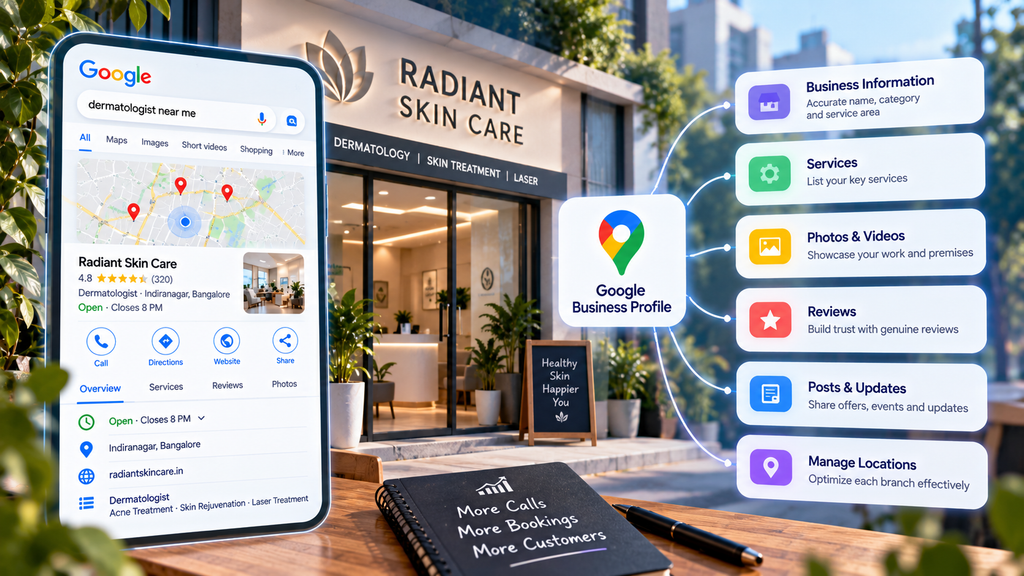
When someone in Bangalore searches “dermatologist near me”, “AC repair Marathahalli,” or “IELTS coaching Jayanagar”, the first thing they usually see isn’t a website. It’s a map with three businesses beneath it, each showing a star rating, a few photos, and a call button.
For service businesses such as clinics, salons, coaching centers, home-service providers, law firms, and agencies, that map is often where customers decide. Many people call straight from it without ever visiting a website. Each of those three listings is a Google Business Profile.
Most businesses set up their profile once, add a phone number and a few photos, and forget it. That’s why getting it right is still one of the most cost-effective things a local business can do.
This guide goes beyond the basics. It’s written for owners and marketers who already have a profile and want it to bring in more calls, bookings, and inquiries. It covers how Google decides which businesses to show, the settings that matter most, how to handle reviews properly, how to manage multiple branches, and how your profile now feeds into AI search.
How Google decides which businesses to show
Google’s own help documentation, Tips to improve your local ranking, names three main factors. Everything else in this guide connects back to them.
Relevance. How well your profile matches what the person searched for. A search for “root canal treatment” favors profiles that clearly show a dental clinic offering that treatment. Complete, accurate details are how Google judges relevance.
Distance. How far your business is from the searcher, or from the location named in the search. You can’t change this much, unless you move. Google also says it may rank a farther business higher if it seems a better match for what the person wants.
Prominence. How well known and trusted your business is. Google says more reviews and positive ratings can improve local ranking. Prominence also draws on what the wider web says about you: links, articles, directory listings, and how well your website ranks.
What this means in practice
You control relevance almost entirely through your profile and website. You can steadily build prominence through reviews and local reputation—distance you mostly accept.
That has a practical consequence many businesses miss. A clinic in Koramangala won’t show up for every search across Bangalore, and no amount of profile optimization will change that. The goal is to dominate the searches in and around the areas you genuinely serve, not to appear everywhere.
Get the foundations right.
These settings shape relevance more than anything else on your profile. They’re also where many service businesses make mistakes that limit visibility or put the profile at risk.
Business name: your real name, nothing added
Google’s guidelines require your profile name to match your real-world name, as it appears on your signage, website, and documents. Adding services or locations, such as “Smile Dental Clinic – Best Dentist in Indiranagar | Root Canal”, breaks those rules.
It’s tempting, because you’ll see competitors doing it and sometimes ranking well. But Google can edit a stuffed name, or a competitor can report it, and repeat violations can lead to suspension. One local SEO specialist says Google may even require video re-verification when it suspects stuffing. Put services and locations in the fields designed for them instead.
The exception: if a service or place genuinely is part of your registered brand name and signage, it’s fine to use it.
Categories: the most important choice you’ll make
Your primary category tells Google what kind of business you are. Many local SEO practitioners consider it the single strongest relevance signal on the profile, so choose the most specific accurate option.
For example, “Dentist” is broad; “Cosmetic dentist” or “Pediatric dentist” may fit better if that’s your actual focus. A coaching center might choose between “Coaching center,” “Language school,” or “Test preparation center” depending on what it really does.
Then add secondary categories for other genuine services. Don’t add categories for things you only occasionally offer, as this dilutes your relevance.
A good way to choose: search your main service on Google Maps, open the top-ranking competitors’ profiles, and note which categories they use. Then pick what’s accurate for you.
Address or service area?
This is the setting service businesses most often get wrong.
- Customers visit you (a clinic, salon, or coaching center): show your address.
- You visit customers (pest control, AC repair, home tutoring, interior design consultations at the customer’s home): you’re a service-area business. If customers don’t come to your premises, Google’s guidelines say to hide the address and list the areas you serve instead.
- Both (a salon that also offers home services): you can show your address and add service areas.
When listing service areas, describe reality. Adding every locality in Bangalore won’t make you rank everywhere. List the areas you genuinely and regularly serve.
Hours, phone, and website
Hours. Keep them accurate, and add special hours for festivals and holidays. Customers who arrive at a closed clinic during Ganesh Chaturthi or Diwali leave angry reviews. Google also tends to show businesses that are open when the person searches.
Phone. Use a number that’s actually answered during business hours. Missed calls from the profile are lost customers.
Website. Link to the most relevant page. For a multi-branch business, that’s usually the specific branch page, not the homepage.
Services, description, attributes and booking
Once the foundations are in place, these fields tell Google and customers exactly what you offer.
Services: be specific
The Services section is where you list what you actually do. Google suggests standard services based on your category, and you can add custom ones.
Be specific and use the words customers use. A physiotherapy clinic might list “Sports injury rehabilitation”, “Back pain treatment”, “Post-surgery physiotherapy “, and “Home physiotherapy visits” rather than one generic “Physiotherapy” entry. Add a short description to each service explaining who it’s for and what’s involved.
Keep service names clean. Google may reject custom services that include prices, phone numbers, or other information that belongs elsewhere.
Business description: write for the customer
The description has a 750-character limit, and only the first part shows before someone expands it. Lead with what matters most to a customer: what you do, who you help, where, and what makes you different.
A weak description: “We are a leading, trusted and best-in-class clinic providing world-class services with a customer-first approach.”
A stronger one: “Physiotherapy clinic in HSR Layout specializing in sports injuries and post-surgery rehabilitation. Our team includes physiotherapists experienced in treating runners and cricketers. We also offer home visits across HSR Layout, Koramangala, and Bellandur. Weekend appointments available.”
The second version mentions services and areas naturally, without repeating keywords. It also answers questions a customer would ask before calling. Don’t include links, phone numbers, or promotional offers here; Google’s guidelines don’t allow them in the description.
Attributes: the small details that win clicks
Attributes are tags that show practical details, such as wheelchair accessibility, online appointments, onsite services, payment options, or languages spoken. Which ones are available depends on your category and country.
They matter more than they look. A parent choosing a pediatric clinic, or an older patient choosing a physiotherapist, may decide on accessibility or appointment options alone. Go through every available attribute and fill in the ones that genuinely apply.
Booking and appointment links
If customers can book online, add your booking or appointment link. For service businesses, this turns a profile view into a confirmed booking without a phone call. Use a link that goes straight to the booking page, not your homepage.
Many Indian service businesses also take bookings on WhatsApp. If that’s your main channel, make sure your phone number is easy to reach, and mention WhatsApp booking in your description and services. According to recent local SEO coverage, Google has been phasing out its older built-in chat and now lets businesses add WhatsApp as a messaging option. Check your profile settings to see whether it’s available for you.
Photos, videos and posts
For a service business, the customer can’t hold your product before buying. Photos and videos help them judge whether your clinic is clean, your salon is modern, or your coaching center is serious.
Photos and videos that build trust
The photos that matter most for service businesses:
- The exterior and entrance, so first-time visitors recognize the building. In Bangalore, where many businesses sit on an upper floor above a shop, this saves many confused phone calls.
- The interior: reception, treatment rooms, classrooms, waiting areas.
- Your team, with names and roles where appropriate. People trust faces more than logos.
- The work itself: a finished interior project, a classroom session, equipment you use. For clinics and salons, respect customer privacy and get consent before showing anyone.
Use real photos rather than stock images, and add new ones regularly. Short videos, such as a 30-second walkthrough of your clinic or a trainer explaining a course, can show far more than a photo.
Ignore advice about geotagging image files or stuffing keywords into filenames. Google doesn’t list these as local ranking factors, and they’re a poor use of your time compared with simply uploading better photos.
Posts: keep the profile visibly active
Posts let you share updates, offers, and events directly on your profile. They’re useful for:
- New services or branches
- Seasonal offers, such as festive packages or a summer batch
- Events, such as a free workshop or demo class
- Helpful updates, such as changed hours or new appointment options
Posts are unlikely to transform your rankings on their own. Their real value is showing customers that the business is active and giving them a reason to act now. A profile whose latest post is from 2023 sends the opposite signal.
A realistic rhythm for most small businesses is one or two posts a month. Plan them alongside your other marketing, so an offer on Instagram also appears on your profile.
Reviews: earning them, answering them, and staying within the rules
Reviews are the part of your profile customers read most closely, and Google says more reviews and positive ratings can improve local ranking. For service businesses, where trust is everything, customers often decide whether to call you or the next clinic on the list.
How to get more reviews
The most effective method is also the simplest: ask every satisfied customer, every time, at the right moment.
- Make it easy. Get your review link from your profile and turn it into a QR code at reception, on invoices, or on a card handed over at the end of a session.
- Use WhatsApp. For many Indian service businesses, a short thank-you message with the review link, sent the same day, works far better than email.
- Time it well. Ask when the customer is happiest: after a successful treatment, a finished project, or a good exam result, not when they’re paying the bill.
- Make it routine. Build the request into your process, so it doesn’t depend on someone remembering.
What Google doesn’t allow
Some common practices violate Google’s review policies and can lead to reviews being removed or the profile being restricted:
- Incentives. Offering a discount, free session,n or gift in exchange for a review.
- Review gating. Asking only happy customers for reviews, or first checking satisfaction privately and sending only positive responders to Google.
- Fake or self-written reviews, including reviews from staff, family members, or paid review services.
- Bulk review drives where many reviews arrive at once from accounts with no other activity.
Google actively removes fake reviews, and a sudden spike of suspicious five-star reviews can do more harm than good. Steady, genuine reviews over time are more valuable and more credible to customers.
How to respond
Reply to every review, positive or negative. Replies show customersyou’res paying attention, and they’re often read as carefully as the reviews.
Positive reviews: thank the person by name, mention something specific from their review, and keep it short. Avoid copying the same reply on every review.
Negative reviews: respond calmly and quickly. Acknowledge the concern, apologize where appropriate, and offer to resolve it offline with a contact number or email. Never argue publicly, and never share private details. Remember that your reply is written for the next hundred people reading it, not just the reviewer.
A note for healthcare, legal, and financial services: don’t confirm that the reviewer is your patient or client, and don’t discuss their case. Respond in general terms, such as “We take all feedback seriously; please contact our clinic manager on [number] so we can look into this,” even if the reviewer has shared details themselves.
Fake or abusive reviews: if a review breaks Google’s policies, for example, it’s from someone who was never a customer or contains hateful language, you can report it for removal. Google won’t remove a review simply because it’s negative.
Managing multiple branches
Many Bangalore service businesses grow branch by branch: a second clinic, a new coaching center, another salon. Each branch can have its own profile, but only if it’s a genuine, separate location.
The rules for multi-location profiles
- One profile per real location. Each branch needs its own address where customers are served, with staff present during stated hours. Virtual offices, co-working desks with no real presence, and addresses used only to appear in another area break Google’s guidelines and are a common reason for suspension.
- Consistent naming. Use the same brand name across all branches, as it appears on each branch’s signage.
- Different details where they genuinely differ. Each branch should have its own phone number (if possible), hours, and photos. Identical profiles with the same stock photos look like duplicates.
- Branch-specific website pages. Link each profile to a page about that branch: its address, directions, team, services offered there, and parking or metro details. This strengthens relevance for that area and gives customers what they need.
- Manage them together. Business Profile Manager lets you group locations, so you can update hours or publish posts across branches without editing each one separately.
Worked example: a coaching institute with three branches
This is a hypothetical example.
An IELTS and spoken-English institute runs branches in Jayanagar, Indiranagar and Whitefield. When the owner audits the profiles, she finds:
- All three use the head office phone number, so callers wait on hold and staff can’t tell which branch a lead belongs to.
- All three link to the homepage, which mainly talks about the Jayanagar branch.
- The Whitefield profile has six reviews; Jayanagar has over two hundred.
- All profiles show the same five photos, taken at Jayanagar.
The fixes:
- Each branch gets its own phone number, so calls go straight to that branch, and leads can be tracked separately.
- The website gets three branch pages, each with its own address, map, nearest metro station, timings, batch options,s and photos. Each profile links to its own page.
- Each branch photographs its own classrooms, team, and entrance.
- The Whitefield team starts asking every student who completes a course for a review, with a QR code at the front desk and a WhatsApp follow-up.
- Posts for institute-wide news, such as new batches, are published across all three profiles at once, while branch-specific events are posted only on that branch.
None of these changes is complicated. Together, they give each branch a fair chance to appear in searches in its own neighborhood, instead of all three relying on one reputation.
Your Business Profile and AI search
Your profile no longer appears only in the map pack. Google’s AI features increasingly use it to answer questions about local businesses directly.
Q&A is gone; Ask Maps has replaced it
If you remember the Questions & Answers section on Business Profiles, it no longer works the way it used to. Google discontinued the Q&A API on November 3, 2025, and the public Q&A section began disappearing from listings in December 2025.
Its replacement is Ask Maps, a Gemini-powered feature that answers people’s questions about a business in real time. According to BrightLocal, Ask Maps was available in the Google Maps mobile apps in the USA and India as of March 2026, and it excluded some categories, including healthcare providers. Check your own category to see whether it appears for your business.
The practical change: businesses can no longer write their own answers to questions on the profile. Instead, Ask Maps draws on your profile details, reviews, photos, and website. If the information isn’t there, the AI can’t use it, or it may rely on what reviewers said.
Google’s AI search uses Business Profile data too.
Google’s official guide to generative AI search notes that AI Overviews and AI Mode can include local business information, and it points businesses to Google Business Profile as the way to provide it.
What to do about it
- Fill in every relevant field. Services, attributes, hours,s and descriptions are the raw material AI answers are built from.
- Answer common questions on your website. Move customer Q&A questions, such as parking, fees, timings, languages spoken, and whether walk-ins are welcome, to your website’s FAQ and branch pages.
- Encourage detailed reviews. A review saying “The physiotherapist explained every exercise and the clinic has lift access” gives AI systems useful, specific information. You can’t script reviews, but asking customers to mention what they came in for usually produces more detailed ones.
- Keep details consistent everywhere. Make sure your name, address, phone number, and hours match across your profile, website, social media, and directories so AI systems don’t pick up conflicting information.
For more on how AI search changes visibility, read our guide to GEO vs AEO vs SEO.
Measuring what your profile delivers
Optimization without measurement is guesswork. Here’s how to see whether your profile is actually bringing in business.
The Performance report
Your Business Profile includes a free Performance report. The most useful numbers for a service business:
- Calls from the profile
- Website clicks
- Direction requests, a strong signal of intent for businesses customers visit
- Bookings and messages, where enabled
- Searches that showed your profile, including the actual search terms people used
The search terms are especially valuable. They show how people are finding you, and sometimes reveal services or phrases worth adding to your profile and website.
Look at trends month over month rather than reacting to a single week. Seasonality, festivals, and exam cycles all affect local searches.
Track website visits from your profile properly
By default, Google Analytics often lumps visits from your Business Profile into general Google organic traffic. To separate them, add UTM parameters to the website link on your profile, for example:
Use a different campaign value for each branch. You can then see in GA4 exactly how many visitors, inquiries, and bookings came from each profile.
Ask every new customer how they found you.
The simplest tracking method is still one of the best. Add a “How did you hear about us?” question to your inquiry form and front-desk process, with “Google Maps” as an option. It catches phone calls and walk-ins that no analytics tool can attribute.
A note on local rankings
Local rankings depend heavily on where the searcher is. You might rank first for “dentist” when searching from your clinic and not appear at all two kilometers away. Checking your ranking by searching from your own phone can be misleading. Local rank-tracking tools that check rankings across a grid of locations give a more realistic view, but the business results above matter more than any ranking report.
Common mistakes that cost visibility, or the whole profile
Keyword-stuffed business names. It may work briefly, but it breaks Google’s guidelines and invites edits, competitor reports, and suspension.
Fake addresses. Using a virtual office, a relative’s home,e or a co-working address you never use to appear in a busier area is one of the most common reasons profiles get suspended.
Showing a home address as a service-area business. If customers don’t visit you, hide the address and set service areas instead.
Letting an agency or ex-employee own the profile. Make sure the business owner holds the primary owner role, and remove access for people who have left. Recovering a profile someone else controls can take weeks.
Making many big changes at once. Changing the name, address, and category at the same time can trigger re-verification. Make major changes deliberately, one at a time where possible.
Buying reviews or offering incentives. Google removes fake reviews and can restrict profiles that repeatedly attract them.
Setting it up once and forgetting it. Outdated hours, unanswered reviews, and photos from years ago can signal to customers that the business may not be well run.
Ignoring edits from Google or the public. Anyone can suggest edits to your profile, and Google sometimes applies them automatically. Check your profile regularly for changes you didn’t make.
A monthly maintenance checklist
Thirty minutes a month keeps most profiles in good shape:
- Reply to every new review
- Check business details for edits you didn’t make
- Update hours for upcoming festivals and holidays
- Add a few new photos
- Publish one or two posts
- Review the Performance report and note search terms worth adding to services or your website.
- Confirm the booking link and phone number still work
- Check who has access to the profile, and remove anyone who no longer needs it
Frequently asked questions
Is Google Business Profile free?
Yes. Creating and managing a Business Profile is free. Google Ads, including ads that appear on Maps, are a separate paid product.
How long does it take to see results from optimizing my profile?
Simple fixes such as correct categories, hours, and services can affect visibility within weeks. Building reviews and local reputation takes longer, usually months of consistent effort. Results also depend on how competitive your category and area are.
Can I rank in areas where I don’t have an office?
Distance is one of Google’s main local ranking factors, so it’s hard to appear in the map pack far from your location. Service-area businesses can list the areas they serve, but this doesn’t guarantee visibility across all of them. For wider reach, use location pages on your website and, where it makes sense, local ads.
Should I add keywords to my business name?
No, unless those words are genuinely part of your real-world business name. Adding services or locations breaks Google’s guidelines and can lead to suspension.
What happened to Questions & Answers on Google Business Profile?
Google discontinued the Q&A feature and has been replacing it with Ask Maps, an AI feature that answers questions using your profile, reviews, and website. Businesses can no longer post their own answers, so put that information on your website and profile instead.
Can I delete negative reviews?
No. You can report a review that breaks Google’s policies, such as a fake review or one with offensive content, but Google won’t remove a review just because it’s negative. A calm, helpful public reply is usually the best response.
Do I need a separate profile for each branch?
Yes, if each branch is a real, staffed location that serves customers. Each should have its own address, ideally its own phone number, and a link to its own page on your website.
Where can I learn to manage Business Profiles professionally?
Local SEO is a practical, in-demand skill, especially for agencies serving clinics, salons, coaching centers, and other local businesses. At Web Marketing Academy, Google Business Profile management is covered as part of hands-on local SEO training, with learners applying it on live projects.
