
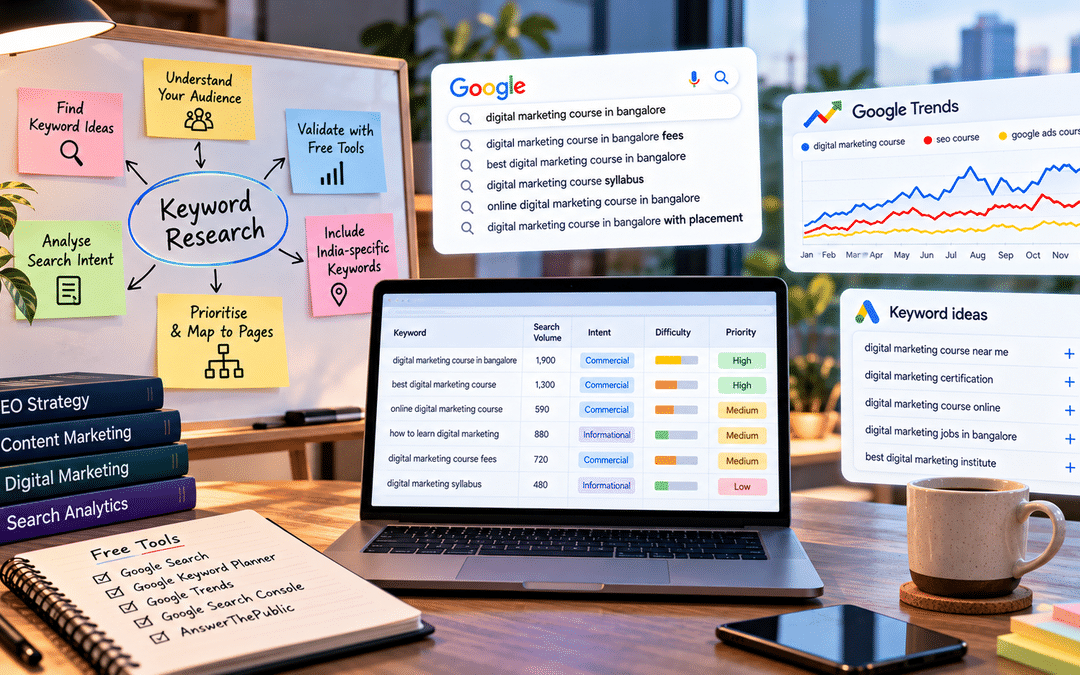
Most beginners think keyword research means finding words with high search volume. Open a tool, sort by the biggest number, write an article. It feels scientific.
It’s also why so many new websites get traffic that never turns into inquiries, or no traffic at all.
Keyword research is really the practice of understanding how your customers describe their problems when they search, and what they want to find when they do. Search volume is one clue in that process, and often not the most important one. A search with 50 monthly searches from people ready to buy can be worth far more than one with 50,000 searches from only curious people.
This guide walks through a complete keyword research process using only free tools: Google itself, Google Keyword Planner, Google Trends, Search Console, and a question-research tool. You don’t need a paid subscription to follow it. By the end, you’ll have a prioritized list of keywords, each matched to the page on your site that should target it.
Intent matters more than volume.
Every search has a purpose behind it, called search intent. Most searches fall into four broad types:
| Intent | What the searcher wants | Example |
| Informational | To learn or understand something | “how to remove rust from a cycle chain” |
| Commercial investigation | To compare options before deciding | “best air purifier for Bangalore apartment” |
| Transactional | To buy, book, or sign up | “order birthday cake online Whitefield” |
| Navigational | To reach a specific brand or site | “Swiggy customer care” |
Getting intent right is the difference between a page that ranks and converts and one that does neither. You’ll see how to judge it later in this guide.
Before you open any tool: build a seed list
A seed keyword is a starting phrase that describes your product, service, or topic. Tools expand seed keywords into hundreds of ideas, but they can only work with what you give them. Weak seeds produce weak lists.
The best seeds come from your customers’ own words, not from your internal jargon. A physiotherapy clinic might call its service “musculoskeletal rehabilitation”; its patients search for “back pain treatment”. Good places to find customer language:
- Questions people ask on calls, WhatsApp chats, and walk-in inquiries
- Your Google reviews and competitors’ reviews
- Sales and support teams, who hear the same questions every week
- Forums and communities where your customers discuss the topic
Write down 10 to 20 seeds. Don’t filter yet.
How Indians search: patterns worth including
Search behavior in India has some distinctive habits. Keyword tools often underrepresent them, so add them to your seed list deliberately. The patterns below are observations from working with Indian search data rather than official statistics, but they appear across almost every category.
Price and budget modifiers. Searches like “washing machine under 20000”, “price in India,” or “fees” are extremely common. Indian buyers research price early.
Location, down to the neighborhood. People don’t just search “gym in Bangalore”. They search “gym in HSR Layout”, “near me”, or even name a landmark or metro station.
Hinglish and transliteration. Many searches mix Hindi and English, or type regional-language words in the Roman alphabet, such as “sasta mobile” or “ghar ka khana delivery”. Depending on your audience, Kannada, Tamil, or Telugu terms typed in English may matter too.
Indian English terms. Words like “lakh”, “2BHK”, “PG”, “tiffin service,” and “coaching center” are how people actually search. Global tools and global advice often miss them.
Exam and life-stage timing. Education, job, and admissions searches spike around results, admission cycles, and placement seasons. Festive shopping clusters around Diwali and major sale events.
If you sell in India, a seed list that includes these patterns will surface opportunities your competitors, working from generic tools, may never see.
Step 1: Start with Google itself
The most underrated keyword tool is the Google search box. It’s free, current, and based on what people actually search.
Autocomplete. Type a seed keyword slowly and note the suggestions. Then try it with letters after it (“cake delivery a”, “cake delivery b”) and with question words in front (“how”, “why”, “which”, “can I”). Each suggestion is a real phrase people search.
People Also Ask. This box of expandable questions appears on many results pages. Clicking one question often reveals more. These are excellent for FAQ sections and for spotting informational content ideas.
Related searches. Scroll to the bottom of the results page for more variations.
Tip: Search in a private or incognito window, so your own search history influences the suggestions less. Suggestions also vary by location, which is useful: what you see in Bangalore reflects local search behavior.
Collect everything in a simple spreadsheet with columns for the keyword and where you found it. Aim for a long, messy list at this stage.
Step 2: Check volume and find ideas in Google Keyword Planner
Google Keyword Planner sits inside Google Ads. It was built for advertisers, but it’s free and widely used for SEO because its data comes directly from Google.
Getting access without running ads
You need a Google Ads account, but you don’t need to run a campaign. When setting up the account, look for the option to switch to expert mode or create an account without a campaign, then open Keyword Planner from the Tools menu. Google changes these labels occasionally so the exact wording may differ. If the setup asks for billing details, you won’t be charged unless you actually run ads.
The two main features
Discover new keywords takes your seed keywords, or a website URL, and returns related keyword ideas. Try entering a competitor’s website to see what topics Google associates with it.
Get search volume and forecasts lets you paste in the list you built in Step 1 and check how often each phrase is searched.
Set the location properly.
By default, the tool may show data for a whole country. For a local business, change the location to your city or region. A term like “physiotherapy clinic” looks very different nationally than it does for Bangalore alone. You can also set the language.
Understand the limits
If your account isn’t spending on ads, Keyword Planner shows search volume as broad ranges, such as 1K–10K, rather than exact numbers. For beginners, that’s fine. You mainly need to know whether a keyword is searched a little, a moderate amount, or a lot, and ranges tell you that.
Two other things to keep in mind:
- The “Competition” column refers to competition among advertisers, not how hard it is to rank organically. A “Low” competition keyword can still be very difficult to rank for organically.
- Very specific long-tail phrases, including many Hinglish and hyperlocal searches, may show little or no volume even when real people search them. If a phrase keeps appearing in autocomplete, it’s being searched.
Step 3: Check timing and direction in Google Trends
Google Trends doesn’t show search volume. It shows relative interest over time on a scale of 0 to 100, where 100 is the peak for that search in the period and place you’ve chosen. That makes it useful for three questions Keyword Planner answers poorly.
Is interest growing or shrinking? Set the range to five years. A keyword with flat volume in Keyword Planner might be rising steadily, or quietly declining.
When does interest peak? Seasonality matters for planning. Searches for rakhi gifts spike in the weeks before Raksha Bandhan, while “rain jacket” in Bangalore rises with the monsoon. Publish or update content a few weeks before the peak, not during it.
Which wording do people prefer? Compare up to five terms side by side, such as “PG” vs “paying guest” vs “hostel”, to see which phrase your audience actually uses. You can narrow the region to a state like Karnataka to check local preferences.
Step 4: Mine Google Search Console for keywords you already rank for
If your website is already live, Google Search Console is the most valuable free keyword tool you have. It shows the actual searches for which your pages appeared in Google, with clicks, impressions, and average position.
Open the Performance report and look at the Queries tab. A few ways to find opportunities:
- Queries at positions 8 to 20. These are searches where you’re close to page one or near the bottom of it. Improving the page that ranks for them is often faster than creating something new.
- High impressions, low clicks. Your page is being shown but not chosen. The title or meta description may not match what searchers want.
- Queries you didn’t expect. People sometimes find you through phrases you never targeted. These can reveal questions worth a dedicated page.
Search Console data only covers searches where your site already appears, so it can’t tell you about topics you haven’t touched yet. That’s what the other steps are for.
Step 5: Find the questions people ask
Question-based searches are ideal for blog posts, FAQs, and guides. They also tend to be the kind of queries AI search features answer, which we’ll return to later.
Besides People Also Ask, a tool like AnswerThePublic groups autocomplete data into questions (“how”, “what”, “which”, “can”), comparisons (“vs”, “or”), and prepositions (“for”, “near”, “without”). The free version allows only a limited number of searches per day, so plan your seeds before you start.
Other free sources of real questions:
- Reddit threads and Quora answers in your topic
- YouTube autocomplete and the comments under popular videos in your niche
- Your own customers’ emails and chats
Add the best questions to your spreadsheet. They often become your most useful informational content.
Step 6: Read the results page to judge intent
No tool tells you intent as reliably as Google’s own results page. Google has already worked out what searchers want for each query, and it shows you the answer. Search each shortlisted keyword and look at what ranks.
| What you see on page one | What it tells you | What to create |
| Mostly blog posts and guides | Informational intent | An in-depth article |
| “Best”, “top 10” and comparison articles | Commercial investigation | A comparison or buyer’s guide |
| Product, category or booking pages | Transactional intent | A product, service or landing page |
| A map with local businesses | Local intent | A location page and a strong Google Business Profile |
| Videos near the top | People want to see it done | A video, or an article with one embedded |
| One brand’s pages dominating | Navigational intent | Usually not worth targeting unless it’s your brand |
The most common beginner mistake happens here. Someone sees that “digital marketing course” has high volume and writes a long blog post about it. But if the results page is full of course pages from institutes, Google has decided that searchers want to compare and enroll, not read an essay. The blog post won’t rank, no matter how good it is.
Match the format Google is already rewarding, then make yours more useful than what’s there.
A quick difficulty check without paid tools
Paid tools give a “keyword difficulty” score. Without one, the results page still tells you a lot:
- Mostly large national brands and major publishers? Hard for a new site. Look for a more specific variation.
- Small businesses, forums (Reddit, Quora), or thin, outdated pages ranking? A good sign. Google is struggling to find strong answers, and a better page has a real chance.
- Results that don’t quite answer the query? Also a gap you can fill.
Step 7: Prioritize with a simple scoring sheet
By now you probably have more keywords than you could ever target. A simple scoring system helps you decide where to start.
Score each keyword from 1 to 3 on four factors:
| Factor | 1 | 2 | 3 |
| Business value | Loosely related to what you sell | Related; could lead to an inquiry later | Directly connected to a product or service |
| Intent fit | Mostly research, far from buying | Comparing options | Ready to buy, book or enquire |
| Winnability | Dominated by big brands | Mixed results | Weak or outdated pages ranking |
| Volume | Rarely searched | Moderate | Frequently searched |
Add the scores. Anything at 10 or above goes to the top of your list.
Notice that volume is only one of four factors, and it’s the last one. A keyword scoring 3 on business value, intent, and winnability but only 1 on volume still scores 10. For a small business, that’s often a better starting point than a high-volume term you have no chance of ranking for.
Step 8: Map keywords to pages
The final step turns your list into a plan. Group keywords that share the same intent and would be answered by the same page, then assign one primary keyword to each page.
For example, “eggless cake Whitefield”, “eggless birthday cake delivery Whitefield” and “eggless cake shop near Whitefield” all want the same thing. They belong on one page, not three.
Two rules keep your mapping clean:
One primary keyword per page. Secondary keywords with the same intent can support it, but each page should have one clear job.
One page per primary keyword. If two pages on your site target the same keyword, they compete with each other. SEO professionals call this keyword cannibalization, and it often leaves both pages ranking worse than one strong page would.
Your finished map can be a simple table: keyword, intent, score, the page that targets it (existing or new), and status. This becomes your content plan.
Worked example: a home bakery in Whitefield
Here’s how the whole process might look for a small business. This is a hypothetical example, and the observations are illustrative, not real data.
The business. Meera runs a home bakery in Whitefield, Bangalore. She specializes in eggless and custom-theme cakes, takes orders on WhatsApp, and has a basic website that gets almost no search traffic.
Seed list. From her WhatsApp chats, customers most often ask about eggless options, delivery areas, photo cakes, same-day orders, and prices. Her seeds: “eggless cake”, “custom birthday cake”, “photo cake”, “cake delivery Whitefield”, “midnight cake delivery”, “cake price per kg”.
Google autocomplete and People Also Ask add phrases like “eggless cake near me”, “theme cake for kids birthday,” and questions such as “how many days in advance to order a custom cake”.
Keyword Planner, set to Bangalore, shows “cake delivery” and “birthday cake” in higher volume ranges. The neighborhood-specific phrases show low volume or none at all, even though they appear in autocomplete.
Google Trends shows cake-related searches rising around festivals and year-end celebrations, so she plans festive content a few weeks ahead.
The results pages tell her that “cake delivery Bangalore” is dominated by large delivery platforms and bakery chains, a hard fight for a home baker. But searches that combine Whitefield with eggless or custom cakes show a local map, a few bakery websites,s and some thin directory listings. That’s winnable.
Her prioritized map:
| Keyword | Intent | Score (out of 12) | Page |
| eggless custom cake Whitefield | Transactional, local | 11 | Homepage (optimize) |
| theme cake for kids birthday Bangalore | Transactional | 10 | New page: kids’ theme cakes |
| midnight cake delivery Whitefield | Transactional, local | 10 | New page: delivery areas and timings |
| How many days in advance to order a custom cake | Informational | 8 | New FAQ-style blog post |
| cake delivery Bangalore | Transactional | 6 | Skip for now |
She also updates her Google Business Profile, because the local map appears for most of her best keywords.
The result is a focused plan of four pages, each with a clear job, instead of a single homepage trying to rank for “cake”. She avoids the most competitive term entirely and concentrates on searches she can realistically win.

Does keyword research still matter with AI search?
With Google’s AI Overviews and AI Mode, and people asking ChatGPT instead of searching, it’s fair to ask whether keywords still matter. They do, but the way you use them is shifting.
AI answers are still built on search. Google’s official guide to generative AI search explains that its AI features retrieve pages through its normal ranking systems before writing an answer. AI draws from pages that rank for relevant queries.
Think in topics, not isolated phrases. Google describes a process called query fan-out, where its AI runs several related searches to answer one question. A page that thoroughly covers a topic, including the natural follow-up questions, is more useful for this than a page built around one exact phrase.
Don’t chase every variation. Google’s guide also notes that its systems understand synonyms and meaning, so you don’t need a separate page for each way of phrasing something. Creating many near-identical pages to catch every variation can violate Google’s spam policies. This is one more reason Step 8, grouping keywords by intent, matters.
Questions are more valuable than ever. People type longer, more conversational questions into AI tools than into a search box. The question research in Step 5 is directly useful here.
For a deeper look at how AI search changes SEO, read our guide to GEO vs AEO vs SEO.
Common beginner mistakes
Choosing keywords by volume alone. High-volume keywords are usually the most competitive and often the least specific. Business value and intent should come first.
Ignoring intent. Writing a blog post for a keyword where Google shows product pages, or a sales page where Google shows guides, rarely works.
Targeting only broad, one- or two-word terms. “Shoes” or “digital marketing” are almost impossible for a small site. Longer, more specific phrases convert better and are far easier to rank for.
Dismissing “zero volume” keywords. Tools miss many real searches, especially hyperlocal and Hinglish ones. If autocomplete suggests it or customers say it, it’s worth considering.
Reading Keyword Planner’s “Competition” as SEO difficulty. It measures advertiser competition, not how hard it is to rank.
Using the wrong location. National data can hide what’s happening in your city. Local businesses should always check local data.
Creating a page for every variation. This splits your authority, creates cannibalization, and can run into Google’s spam policies—group similar keywords on one strong page.
Doing keyword research once. Search behavior, competitors, and platforms change. Revisit your list every few months, and check Search Console regularly for new opportunities.
Frequently asked questions
Can I do keyword research for free?
Yes. Google autocomplete, People Also Ask, Google Keyword Planner, Google Trends,s and Google Search Console are all free, and together they cover everything a beginner needs. Paid tools add convenience, competitor data, and difficulty scores, but they aren’t essential to get started.
Is Google Keyword Planner free?
Yes. You need a Google Ads account, but you don’t have to run ads. Without ad spend, search volumes appear as ranges rather than exact numbers, which is still enough for comparing keywords.
How many keywords should I target on one page?
One primary keyword, plus closely related secondary keywords with the same intent. If two keywords need different content to satisfy the searcher, they belong on different pages.
What is a long-tail keyword?
A longer, more specific search phrase, such as “eggless birthday cake delivery in Whitefield” rather than “cake”. Individually, they’re searched less often, but they’re easier to rank for and usually closer to a purchase.
How often should I do keyword research?
Do a full round when you plan a new website or content strategy. After that, revisit every few months, and check Search Console monthly for new queries and pages close to page one.
How do I know if a keyword is too difficult?
Search it and look at page one. If it’s filled with major national brands and publishers, it’s likely too hard for a new site. If smaller sites, forums, or outdated pages appear, you have a realistic chance.
Where can I practice keyword research hands-on?
The best practice is on a real website, whether your own, a friend’s business, or a volunteer project. Structured training helps too: at Web Marketing Academy, keyword research is taught as part of practical SEO training, where learners work with tools like Keyword Planner and Search Console on live projects.
