
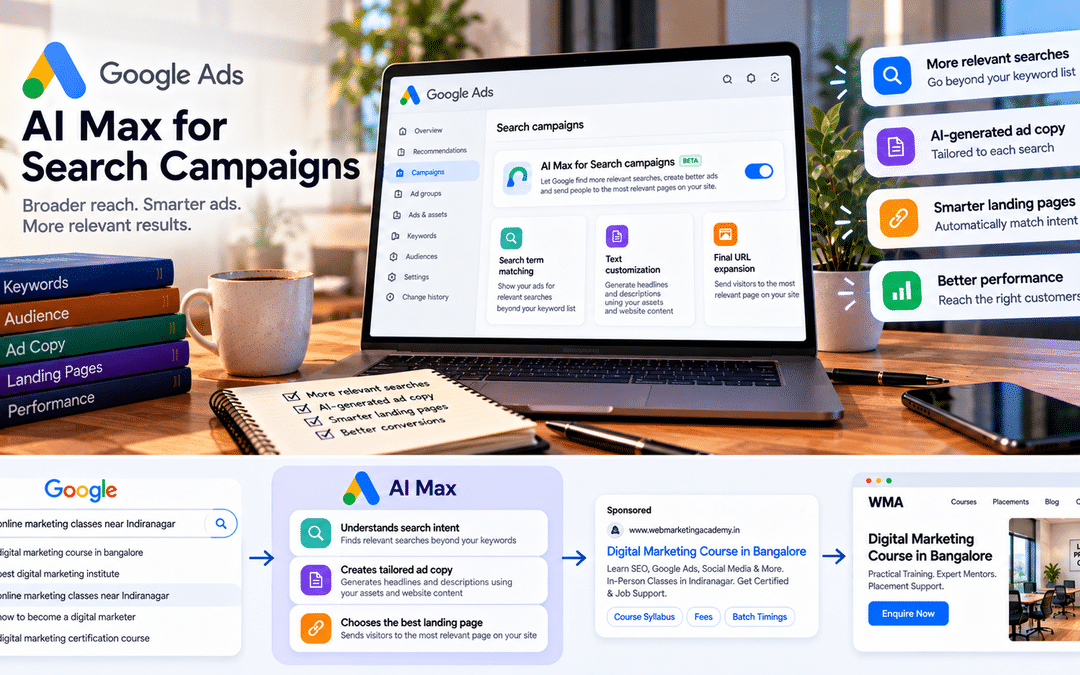
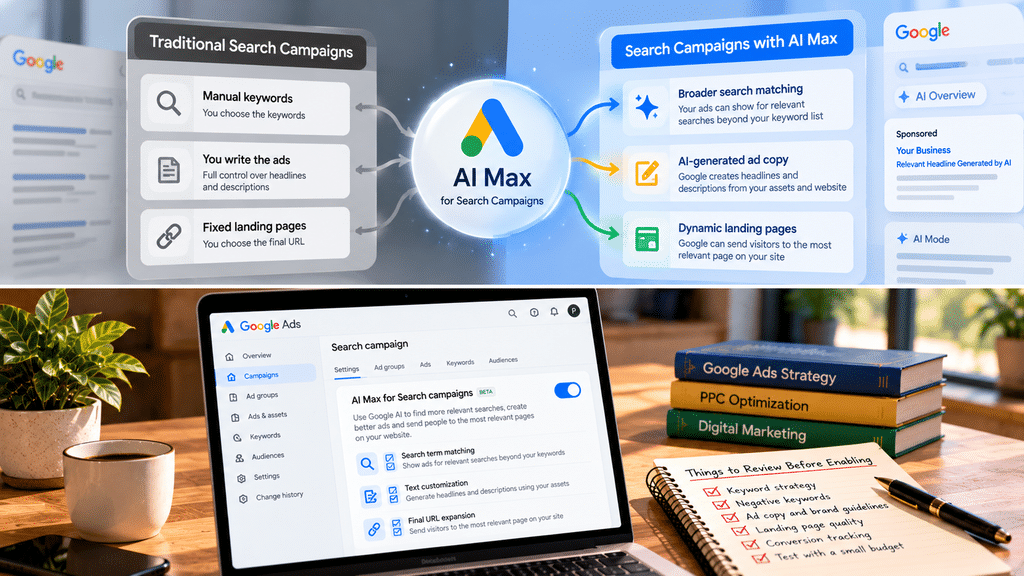
For years, Google Ads Search campaigns worked the way most advertisers understood. You chose keywords, wrote ads, and picked landing pages. Google matched searches to your keywords, and you controlled most of what the searcher saw.
AI Max for Search campaigns change that bargain. Switch it on, and Google can show your ads for searches beyond your keyword list, write parts of your ad copy, and send people to pages on your site you didn’t choose. In return, Google promises to find more of the searches that lead to conversions.
For some accounts that’s a genuine improvement. For others, it means paying for irrelevant clicks, ads that make claims your business can’t support, or leads landing on the wrong page. Which one you get depends less on the feature than on how well your account is set up before you turn it on.
This guide explains what AI Max actually changes, which controls you keep, how to decide whether it suits your account, and how to test it without risking your budget. It’s written for PPC executives, marketing managers, and business owners who already Search campaigns.
What AI Max for Search is
AI Max isn’t a new campaign type. According to Google’s Ads documentation, it’s an optimization layer added to an existing Search campaign. You keep your campaign, ad groups, keywords, and budget, and switch on a set of AI features on top.
It bundles three features:
| Feature | What it does | What it replaced or absorbed |
| Search term matching | Shows your ads for relevant searches beyond your keyword list, using broad match and “keywordless” technology that reads your ads and landing pages | Broad match expansion and the matching side of Dynamic Search Ads |
| Text customization | Generates headlines and descriptions from your existing ads, keywords, assets, and website | Automatically created assets |
| Final URL expansion | Sends visitors to the page on your site that Google judges most relevant to the search | The landing-page side of Dynamic Search Ads |
Google’s help documentation notes that final URL expansion works only when text customization is on, so the ad copy matches the page it sends people to.
How it has evolved
| Date | Change |
| May 2025 | AI Max launched in beta |
| April 15, 2026 | Google announced AI Max was out of beta and set a timeline to retire Dynamic Search Ads |
| Mid-2026 | AI Max became the default setting when creating new Search campaigns |
| September 2026 | Campaigns using automatically created assets or the campaign-level broad match setting began converting to AI Max |
| February 2027 | Remaining Dynamic Search Ads campaigns are scheduled to migrate automatically, after Google postponed the original September 2026 date |
The practical message: even if you’ve never chosen AI Max, it may already be running in some of your campaigns, or will be soon. Check your campaign settings rather than assuming.
What actually changes in your account
1. Your match types stop meaning what they used to
This is the change that surprises advertisers most. With search term matching on, Google applies broad match behavior to your phrase and exact match keywords, and adds keywordless matching based on your ads and landing pages.
In practice, an exact match keyword like [digital marketing course bangalore] no longer limits your ads to that search and its close variants. Your ads may also show for “online marketing classes near Indiranagar” or “how to become a digital marketer” if Google judges them relevant.
Negative keywords still apply, and they become far more important. They’re your main tool for keeping matching on track.
2. Google writes some of your ad copy
Text customization generates headlines and descriptions from your existing ads, keywords, assets, and website content. That helps ads match longer, more specific searches, but it also means a headline you never wrote can appear in front of customers.
One detail that catches people out: when final URL expansion is on, Google’s help documentation says pinned assets in responsive search ads are not respected. If you pin a mandatory disclaimer or compliance line, it may not appear in the position you set.
3. Google may choose your landing page
With final URL expansion, Google can send visitors to whichever page on your domain it considers most relevant, not the final URL you set. For an e-commerce site, that can mean a specific product page instead of a category. For a lead-generation site, it can mean a blog post, a careers page, or an old offer page instead of your conversion-optimized landing page.
4. Your ads can appear in AI Overviews and AI Mode
Ads inside AI Overviews require broad match or keywordless targeting. Exact and phrase match keywords alone aren’t eligible. AI Max is one route in, though not the only one: Google’s Ads Liaison has confirmed that campaigns using broad match without AI Max are also eligible. Google has also been testing exact and phrase match text ads in AI Mode, so these rules are still moving.
There’s a reporting catch. Ads shown in AI Overviews and AI Mode are currently reported together with other top-of-page ads, with no separate breakdown. You can’t yet see exactly how these placements perform.
Availability of ads in AI features varies by country, language, and industry. Some categories, such as healthcare and finance, face additional restrictions. Check current eligibility for your market.
5. New reporting and new things to review
AI Max adds reporting that shows which searches came from AI Max matching, along with the headlines and landing pages used. This is how you judge whether the expansion is helping. It also adds ad group-level options such as locations of interest and brand settings, covered in the next section.
The controls you keep
AI Max shifts decisions to Google, but it doesn’t remove them all. These are the main levers, based on Google’s documentation. Set them up before you switch the features on, not after you see problems.
| Control | What it does | When to use it |
| Individual feature switches | Turn search term matching, text customization, or final URL expansion on or off separately. Search term matching can also be turned off for individual ad groups. | When you want some features but not others, for example, matching without Google choosing landing pages |
| Negative keywords | Block searches you never want to appear for | Always; they’re your main defense against irrelevant matches |
| Brand inclusions and exclusions | Limit which brand searches your ads can match, or exclude specific brands | To stop ads showing on competitor brand searches, or to restrict brand campaigns to your own brand |
| URL exclusions | Stop final URL expansion from sending traffic to specific pages | Careers, blog, old offers, privacy pages, anything that won’t convert |
| URL inclusions | Add pages that final URL expansion should consider | When important landing pages aren’t being picked up |
| Text guidelines | Exclude specific terms and set messaging restrictions for generated text | Regulated industries, legal claims, words your brand never uses |
| Locations of interest | Target people searching for a location, at the ad group level | Multi-city businesses with different ad groups per city |
| Asset review | Review and remove generated headlines and descriptions | Weekly at first, especially in sensitive categories |
| Bidding and conversion goals | Choose what Google optimizes towards | Always; AI Max learns from the conversions you track |
The control that matters most isn’t on this list
AI Max optimizes towards your conversion data. If you count every page visit or form view as a conversion, Google will find more of those, not more customers. If your conversion tracking counts real leads, ideally with lead quality fed back through offline conversion imports, it has something useful to aim at.
For many Indian lead-generation accounts, this is the weakest link. WhatsApp leads, phone calls, and walk-ins often aren’t tracked at all, so the system only sees a fraction of what actually drives revenue. Fix that before expanding matching.
Should you turn it on? A decision framework
There’s no universal answer. AI Max suits some accounts well and others badly. These questions help you decide, feature by feature.
Five questions to ask first
1. Is your conversion tracking trustworthy? If conversions are inflated, missing, or not linked to real leads, AI Max will optimize towards the wrong thing. Fix tracking first.
2. Do you have enough conversion volume? Automated systems learn from data. A campaign with only a handful of conversions a month gives AI Max little to learn from, and its expansion is more likely to be guesswork.
3. Is your budget limited? Expanded matching spends on new searches. If your budget already runs out by midday on proven keywords, broader matching may divert money from searches you know convert.
4. Can Google safely write your copy and choose your pages? Regulated industries such as healthcare, finance, legal, and education need tight control over wording for specific claims. Sites with many low-value pages need careful URL exclusions.
5. Are you already reaching most of your relevant demand? If your keywords cover the market well, AI Max may add little. If you suspect you’re missing long-tail and conversational searches, it has more room to help.
A feature-by-feature view
| Situation | Search term matching | Text customization | Final URL expansion |
| Strong tracking, healthy volume, room to grow | Test it | Test it | Test it, with URL exclusions |
| Good tracking, limited budget | Test carefully on one campaign | Test it | Optional |
| Regulated industry or strict brand rules | Test with strong negatives | Only with text guidelines and close review | Usually keep off |
| Lead-gen site with one dedicated landing page | Test it | Test it | Usually keep off |
| Large site with many relevant pages (e-commerce, multi-service) | Test it | Test it | Often useful, with exclusions |
| Weak or unreliable tracking | Wait | Wait | Wait |
Remember that Google now enables AI Max by default on new Search campaigns. Deciding not to use it is a choice you have to make actively when building a campaign.
How to test AI Max safely
Switching AI Max on across an entire account and watching what happens is the riskiest way to evaluate it. A controlled test tells you far more. Google itself recommends Campaign Experiments for comparing AI Max against existing setups.
Before the test: prepare the guardrails
- Audit conversion tracking. Confirm that conversions reflect real leads or sales, and that calls and WhatsApp inquiries are tracked where possible.
- Strengthen negative keywords. Add the searches you never want: “free”, “jobs”, “salary”, “course PDF”, “meaning”, competitor names if you don’t want them, and anything your search terms report has already shown to be wasteful.
- Set brand controls. Decide whether you want to appear for competitor brands, and exclude them if not.
- Add URL exclusions. List pages that should never receive ad traffic: careers, blog, old offers, terms and privacy pages.
- Add text guidelines. Exclude claims and words your business can’t use, such as “guaranteed”, “best”, “100%” or regulated terms.
Running the test
- Pick one campaign with steady conversion volume, not your smallest or most experimental.
- Use a Campaign Experiment to split traffic between the original campaign and an AI Max version.
- Change only AI Max. Don’t alter budgets, bidding, or ads in either arm during the test.
- Run it long enough to collect a meaningful number of conversions in both arms; for many small accounts that means several weeks, not days.
Judge it on the right numbers.
Compare the two arms as whole campaigns, not just the conversions AI Max reports for its own new matches. Some PPC practitioners have questioned how AI Max attributes conversions that your existing keywords might have captured anyway. A campaign-level experiment avoids that trap.
The question to answer: did the AI Max arm produce more qualified leads or sales at an acceptable cost? Look at cost per lead, conversion rate, total conversions, and, if you can, lead quality from your CRM or sales team.
What to monitor every week
- Search terms report, filtered to AI Max matches. Add negatives for anything irrelevant.
- Landing pages chosen by final URL expansion. Exclude any that don’t convert.
- Generated headlines and descriptions. Remove anything inaccurate, off-brand, or non-compliant.
- Competitor and brand terms, to check brand controls are working.
- Average CPC and cost per lead compared with the control arm.
- Lead quality, by asking the sales team whether AI Max leads look different.
The first few weeks need the closest attention. Once you trust the guardrails, the review can become less frequent.
Worked example: a home interiors company in Bangalore
This is a hypothetical example. The figures are illustrative, not benchmarks.
The account. A home interiors company runs Search campaigns for modular kitchens, wardrobes,s and full-home interiors in Bangalore. Its main campaign uses phrase and exact match keywords and sends traffic to a dedicated landing page with a consultation form. It tracks form submissions and, through Google Tag Manager, WhatsApp and call clicks. It averages a steady number of leads each month, enough for a meaningful test.
The concern. Google recommends enabling AI Max. The marketing manager worries about three things: ads appearing for “interior design course” or “interior designer jobs”, Google sending people to the company’s blog instead of the landing page, and generated headlines promising things like “lowest price guaranteed”.
The preparation.
- A negative keyword list is expanded with “course”, “jobs”, “salary”, “DIY”, “free”, “images”, and “ideas”.
- Brand controls exclude competitor brand names.
- Final URL expansion is left off because the landing page is purpose-built and the rest of the site is mostly blog content.
- Text guidelines exclude “guaranteed”, “lowest price”, “cheapest,” and “free”.
The test. A Campaign Experiment runs the original campaign against a version with search term matching and text customization on, split evenly, for six weeks.
What the review finds:
- The AI Max arm gets more impressions and clicks, many from longer searches such as “2BHK full interior cost Whitefield” and “modular kitchen for small apartment Bangalore”—several of these turn into leads.
- Some matches are irrelevant, such as searches for interior design software and furniture rental. These become negative keywords in week two.
- Two generated headlines mention services the company doesn’t offer. They’re removed.
- At the end, the AI Max arm has more total leads at a slightly higher cost per lead. The sales team reports that lead quality is similar.
The decision. The company adopts AI Max for this campaign with the same guardrails, keeps final URL expansion off, and schedules a weekly search terms review. It plans a separate test of final URL expansion later, after building dedicated pages for kitchens and wardrobes.
The outcome isn’t guaranteed to look like this for every account. The point is the process: guardrails first, a controlled test, and a decision based on leads rather than clicks.
Common mistakes
Not knowing AI Max is already on. With AI Max now the default for new Search campaigns, and older settings being converted automatically, many advertisers are running it without realizing. Check every Search campaign’s settings.
Turning it on before fixing tracking. AI Max amplifies whatever your conversion data says. Poor tracking leads to confident optimization toward the wrong outcome.
Assuming exact match still means exact. With search term matching on, your exact and phrase keywords behave much more broadly. Budget and negative keyword planning must reflect that.
Leaving final URL expansion on for a single-landing-page business. If one page is designed to convert, letting Google send traffic elsewhere rarely helps.
Relying on pinned assets for compliance. Pinning isn’t respected when final URL expansion is on. Use text guidelines and asset review instead.
Judging success by AI Max’s own conversion reports. Use a campaign-level experiment, so you measure the total effect rather than credit that may have shifted from existing keywords.
Setting it and forgetting it. AI Max needs regular review of search terms, landing pages, and generated text, especially in the first weeks.
Expecting AI placements to be measurable already. Ads in AI Overviews and AI Mode are currently reported with other top-of-page ads. Don’t build a strategy around numbers you can’t yet see.
Frequently asked questions
What is AI Max for Search campaigns?
It’s a set of AI features you can add to a Google Ads Search campaign: search term matching, which expands the searches your ads show for; text customization, which generates ad copy; and final URL expansion, which chooses landing pages. It works on top of your existing campaign rather than replacing it.
Is AI Max the same as Performance Max?
No. Performance Max runs across many Google channels, including YouTube, Display,y and Gmail. AI Max applies only to Search campaigns and Search ads.
Do I need AI Max to show ads in AI Overviews and AI Mode?
Not necessarily. Google has confirmed that campaigns using broad match keywords are also eligible. AI Max expands eligibility by applying broad match behavior to exact and phrase keywords and adding keywordless matching.
Can I turn off parts of AI Max?
Yes. Search term matching, text customization, and final URL expansion can be controlled separately, and search term matching can be switched off for individual ad groups. Final URL expansion requires text customization to stay on.
Do negative keywords work with AI Max?
Yes, and they’re more important than before, because AI Max matches a much wider range of searches.
What happens to my Dynamic Search Ads?
Google plans to migrate remaining Dynamic Search Ads campaigns automatically in February 2027, after delaying the original September 2026 date. Google recommends testing and upgrading before then, so you can control the settings.
Is AI Max good for small budgets?
It can be, but expanded matching can spread a small budget across untested searches. Accounts with limited budgets and conversion volume should test carefully on one campaign, with strong negative keywords.
Where can I learn Google Ads hands-on?
Platform changes like AI Max are easiest to understand by working in real accounts. Google’s Skillshop offers free Google Ads training and certifications. At Web Marketing Academy, Google Ads is taught through hands-on campaign work on live projects.
