
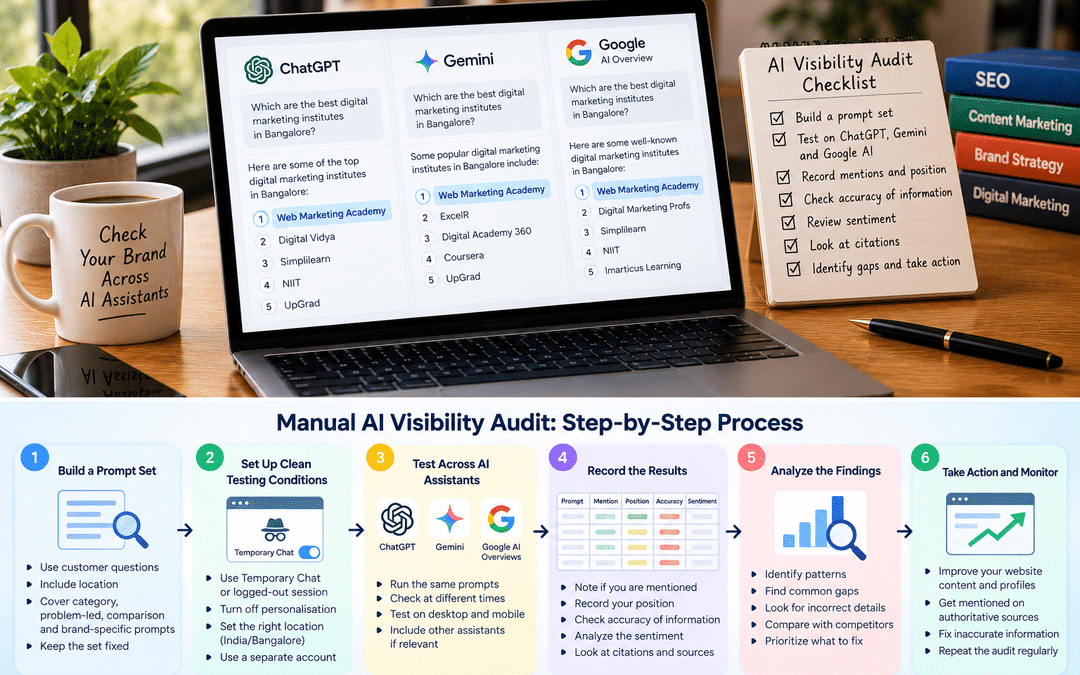
More people now ask an AI assistant before they ever open a search results page: “Which IELTS coaching center in Bangalore is good?” “Best CA firm for startups in Koramangala?” “Is this brand of air purifier worth buying?” The answer they get often names two or three businesses. If yours isn’t one of them, you may never know you were left out.
Most businesses have no idea what ChatGPT, Gemini, or Google’s AI features say about them. Some aren’t mentioned at all. Some describe them using outdated information, like an old address, a discontinued service, or last year’s prices. Some compare them unfavorably with a competitor based on a single forum thread.
Paid AI-visibility tools exist, and they can help larger brands track this at scale. But a small or medium business can learn a great deal with a spreadsheet, a free AI account,t and a couple of hours a month. This guide shows you how to run that manual audit: which questions to ask, how to test fairly, what to record, how to read the results, and what to do about them.
What “AI visibility” actually means
It’s more than whether your name appears. A useful audit tracks five things:
| Measure | The question it answers |
| Mention | Does the AI name your business at all? |
| Position | Are you recommended first, listed among others, or added as an afterthought? |
| Accuracy | Are the facts right: services, location, prices, timings? |
| Sentiment | Is the description positive, neutral, or negative, and why? |
| Citation | Does the answer link to your website, or to someone else’s page about you? |
A business mentioned often but described inaccurately has a different problem from one that’s never mentioned. The audit helps you tell which problem you have.
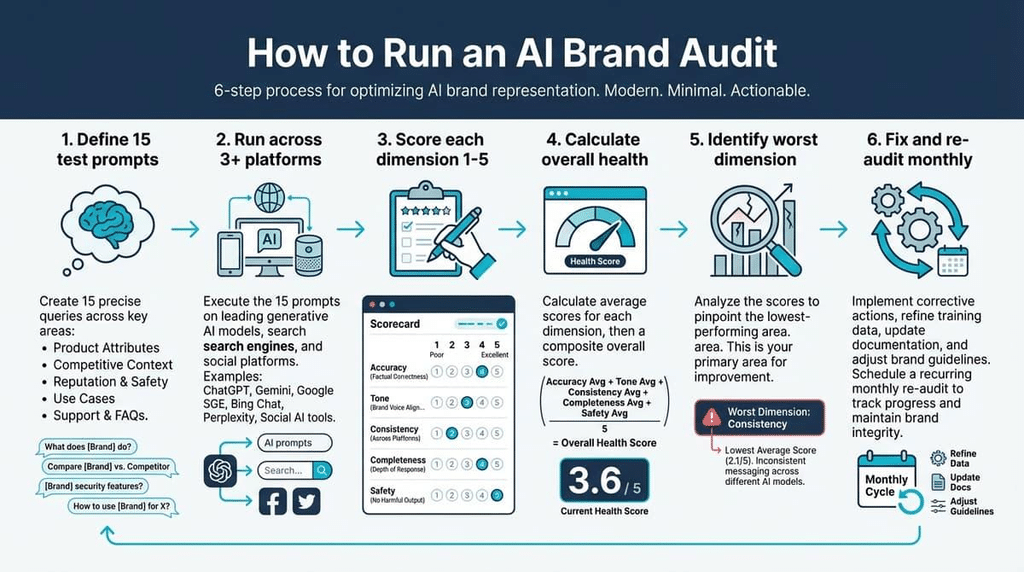
Step 1: Build a prompt set
The quality of your audit depends on the questions you ask. Use the questions real customers would ask, not ones designed to make your brand appear.
Aim for 15 to 25 prompts across four types:
| Prompt type | What it reveals | Example (a Bangalore coaching institute) |
| Category discovery | Whether you appear when someone doesn’t know any brand yet | “Which are good IELTS coaching centers in Bangalore?” |
| Problem-led | Whether you appear when someone describes a need | “I need a band 7 in IELTS in two months while working full-time. Where should I study in Bangalore?” |
| Comparison | How you’re positioned against competitors | “Compare [your brand] and [competitor] for IELTS coaching.” |
| Brand-specific | What the AI “knows” about you, and whether it’s accurate | “What does [your brand] offer? What are its fees and timings? What do students say about it?” |
Tips for good prompts
- Use customers’ words. Check inquiry calls, WhatsApp chats, and reviews for how people phrase their needs.
- Include location naturally. Local businesses should use the neighborhood and city in some prompts, the way customers do: “near Jayanagar”, “in South Bangalore”.
- Mix short and conversational prompts. People type short queries into search boxes but often ask AI assistants long, detailed questions with personal context.
- Add prompts in other languages if relevant. If your customers use Hindi, Kannada, or another language, test a few prompts in those languages too.
- Keep the set fixed. Use the same prompts every month so that you can compare results over time. Add new ones in a separate section.
The category and problem-led prompts matter most for growth, because they show whether you’re discovered by people who haven’t heard of you. Brand-specific prompts matter most for accuracy and reputation.
Step 2: Set up clean testing conditions
AI assistants personalize their answers. If you’ve spent months asking ChatGPT about your own business, it may mention you simply because it remembers your interest. That makes your results look better than what a stranger would see.
Remove personalisation
- ChatGPT: use a Temporary Chat, which doesn’t use or update memory, or test in a logged-out browser session where available.
- Gemini: Google added Temporary Chats and personal context controls to Gemini. Its memory of past chats is on by default, so use a Temporary Chat for audits.
- Google AI Overviews and AI Mode: use a private browser window, signed out, so your search history has less influence.
- Other assistants: if your customers use Perplexity, Copilot, or Claude, test those too, with personalization off where possible.
Ideally, use a separate account created only for auditing, never used for questions about your own business.
Control what you can
Location. Answers to local questions depend on where the AI thinks you are. Run the audit from the area your customers are in, or include the location in the prompt.
Search on or off. ChatGPT sometimes answers from its training data and sometimes searches the web first. Note which happened for each answer; it affects what you can fix.
Model version. Note which model or mode you used, such as a fast model versus a reasoning or deep research mode. Different modes can give different answers.
Repeat each prompt
AI answers vary from one attempt to the next, even with identical prompts. Run each prompt three times in fresh chats and record all three. A brand that appears in three out of three answers has much stronger visibility than one that appeared once by chance.
This variability is the single most important thing to understand about AI visibility. A single screenshot, good or bad, proves very little.
Step 3: Record what each AI says
A simple spreadsheet is enough. Create one row for each prompt, platform, and attempt, with these columns:
| Column | What to record |
| Date | When you ran the prompt |
| Platform and mode | ChatGPT, Gemini, AI Overview, AI Mode, Perplexity; plus model or mode |
| Prompt | The exact wording, from your fixed set |
| Attempt | 1, 2, or 3 |
| Searched the web? | Yes or no, if the platform shows it |
| You mentioned? | Yes or no |
| Position | First, among several, last, or not mentioned |
| Competitors mentioned | Every other business named, in order |
| Accuracy issues | Wrong address, outdated service, wrong price, invented detail |
| Sentiment | Positive, neutral, or negative, with a note on why |
| Sources cited | Which websites the answer linked to or named |
| Notes | Anything else worth remembering |
Save screenshots of important answers, especially inaccurate or negative ones, with the date visible. They’re useful when you need to show colleagues or clients what you found, and when you check later whether a fix worked.
The sources cited column is often the most useful. It shows which websites AI systems rely on for your category: perhaps a particular directory, a review site, a news article, a Reddit thread,d or a competitor’s blog. Those places shape what AI says about you.
Step 4: Analyze the results
Once you have a month’s data, turn the rows into a few simple numbers and lists.
Four numbers worth calculating
Mention rate—the share of answers that mention you. If you ran 20 prompts three times on two platforms, that’s 120 answers. Being mentioned in 30 of them is a 25% mention rate. Calculate it separately by platform and by prompt type.
Share of voice. Count how often each brand appears across all answers, including competitors. If a competitor appears in 70 answers and you appear in 30, you know who AI systems currently favor in your category.
Accuracy rate. Of the answers that mention you, how many get the key facts right?
Top sources. Count which websites are cited most often. The top five or ten sources are your most important targets.
Reading the patterns
| What you see | Likely explanation | Where to look |
| Never mentioned in any answer | AI systems find little about you, or can’t access your site | Crawler access, your website content, your presence on cited sources |
| Mentioned for brand questions but not category ones | AI knows you exist but doesn’t see you as a leading option | Reviews, comparisons, third-party mentions, content showing your expertise |
| Mentioned on Google AI but not ChatGPT, or the reverse | Different platforms rely on different sources and crawlers | Robots.txt settings, Bing presence, sources each platform cites |
| Mentioned with outdated or wrong facts | Old information is still widely published | Directory listings, old articles, your own outdated pages |
| Mentioned negatively | A small number of negative sources may dominate | The cited pages, review profiles, forum threads |
| A competitor dominates | They appear on the sources AI trusts in your category | Compare their presence on those sources with yours |
Write down the two or three findings that matter most. A good audit ends with a short list of problems, not a large spreadsheet nobody reads.
Step 5: Act on what you find
You can’t edit what an AI says directly. You can change the information it draws from. Work through these four areas, in this order.
1. Access: can AI systems reach your site?
Check your robots.txt file. If it blocks OAI-SearchBot, your site can’t appear in ChatGPT search. If it blocks Bingbot, it affects Microsoft Copilot. In Google Search Console, make sure your site isn’t excluded from generative AI features. Our guide to GEO vs AEO vs SEO explains these crawlers and settings.
2. Substance: Does your site answer the prompts?
Look at the prompts where you weren’t mentioned. Does your website clearly answer them? A coaching institute that never states its batch timings, fee range, faculty experience, or results won’t be described accurately, because the information isn’t there.
Create or improve pages that genuinely answer customer questions, with specific, first-hand information: who you serve, what you offer, how it works, what it costs, what makes you different. Avoid thin pages written only to target prompts; Google treats mass-produced pages of that kind as spam.
3. Presence: what does the wider web say?
AI answers rely heavily on third-party sources. Using your top-sources list:
- Fix inaccurate listings on directories and review sites AI systems cite. Correct addresses, phone numbers, services, and timings.
- Strengthen your Google Business Profile, which feeds Google’s AI features for local queries.
- Earn more genuine reviews on the platforms that appear in AI answers.
- Get genuinely mentioned in places AI cites for your category: local news, industry publications, partner websites, credible comparison articles.
- Respond to legitimate criticism constructively where it appears publicly.
Don’t plant fake reviews or forum posts. They violate platform rules, Google’s systems are designed to catch them, and being exposed would damage the reputation you’re trying to build.
4. Corrections and monitoring
If an AI states something clearly wrong about your business, use the platform’s feedback option (e.g., the thumbs-down button) to report it. This won’t fix the answer immediately, but it’s worth doing alongside fixing the underlying sources.
Then repeat the audit monthly, using the same prompts and conditions. Changes in AI answers usually take weeks or months to appear, and some depend on when the model is updated.
Data to add from Search Console, Bing and GA4
Your manual audit shows what AI says. Three free tools show part of what happens as a result. None gives the full picture, but together they’re a useful supplement.
| Tool | What it shows | Limitation |
| Google Search Console: Generative AI performance report | How often your pages appear in Google’s AI Overviews and AI Mode | At launch, it showed impressions only, not clicks, and says nothing about ChatGPT or other assistants |
| Bing Webmaster Tools: AI Performance report | Which of your pages are cited in Microsoft Copilot and Bing’s AI answers, and the queries that led to citations | Covers Microsoft’s AI experiences only |
| GA4: AI Assistant channel | Visits to your site from recognized AI assistants such as ChatGPT and Gemini, grouped into their own channel since May 2026 | Not retroactive; some AI visits still appear as Direct |
Bing’s report is especially useful for this audit, because the citation queries show what people were asking when Copilot used your pages. That can inspire new prompts for your test set.
The GA4 channel tells you whether AI mentions turn into visits, and whether those visitors become leads. Compare its engagement and key events with other channels. Our GA4 for Beginners guide explains how to find it.
What about paid AI-visibility tools?
Several tools now automate prompt tracking across AI platforms. They can save time for brands tracking many products, markets, or competitors. Treat their scores as estimates: they run prompts in their own conditions, and AI answers vary. Google has also stated that no third-party tool has access to its internal ranking or AI systems. For most small and medium businesses, the manual audit is a good place to start before paying for one.
Worked example: a Bangalore coaching institute
This is a hypothetical example. The names and figures are illustrative.
The business. An IELTS and spoken-English institute in Jayanagar gets most students through Google search and referrals. Several new enquirers mention they “asked ChatGPT” before calling, so the owner wants to know what AI tools say.
The prompt set. Twenty prompts: eight category prompts (“good IELTS coaching in South Bangalore”), six problem-led prompts (“IELTS coaching for working professionals with weekend batches in Bangalore”), three comparisons with the two main competitors, and three brand prompts. Each is run three times on ChatGPT and Gemini using Temporary Chats, and checked in Google with AI Overviews and AI Mode in a private window.
What the first audit finds:
| Finding | Detail |
| Mention rate | Mentioned in about 15% of answers overall, almost all from brand prompts |
| Share of voice | One competitor appears in more than half of category answers |
| Accuracy | Brand answers state an old address and fees from three years ago |
| Sentiment | Mostly neutral; one answer repeats a complaint about batch sizes from an old forum thread |
| Top sources | An education portal’s “top coaching centers” list, two directories, a Reddit thread, and the competitor’s own blog |
Diagnosis. AI tools know the institute exists but rarely recommend it, and when they do, they rely on outdated third-party information. The competitor appears on the education portal’s list and has detailed pages about its weekend batches and student results. The institute’s own website has a single “Courses” page with no fees, timings, or faculty details.
Actions over the next three months:
- Robots.txt is checked; nothing important is blocked.
- The institute adds pages for weekend IELTS batches, working-professional programs, and faculty profiles, with current fee ranges and timings.
- The institute corrects directory listings and the Google Business Profile with the current address, timings, and services.
- The institute contacts the education portal to update its listing and starts asking students for reviews after they receive their scores.
- The owner replies constructively in the old forum thread, explaining that batch sizes are now capped.
- The audit is repeated monthly.
Three months later. Brand answers now show the correct address in most cases. The institute appears in some weekend-batch and working-professional prompts, where it previously didn’t. The competitor still leads general category prompts. The owner now has a clear picture, a short list of next steps, and a way to measure progress, which is exactly what the audit is for.
Limitations and common mistakes
What a manual audit can’t tell you?
- How many people actually ask these questions. AI platforms don’t publish prompt volumes. Your prompt set is an informed sample, not a measure of demand.
- What every user sees. Answers vary by person, location, history, and model version. Your audit approximates a typical answer; it can’t show all of them.
- Exactly why an AI chose a brand, you can see which sources it cited, not how it weighed them.
These limits are why the audit is best used to spot patterns and track change over time, not to produce precise rankings.
Common mistakes
Testing in your own logged-in account. Personalization can make your brand look more visible than it is.
Running each prompt once. One answer can be a fluke. Repeat prompts and look at the pattern.
Writing prompts that favor your brand. “Is [your brand] the best IELTS institute in Jayanagar?” tells you little. Ask the questions real customers ask.
Changing the prompt set every month. You lose the ability to compare. Keep the core set fixed.
Focusing only on your own website. For many businesses, the sources AI cites about them are directories, reviews, and articles on other sites.
Trying to game the results. Fake reviews, planted forum posts, and mass-produced pages carry real risks and rarely last.
Expecting fast changes. AI answers can take months to reflect improvements, especially when models rely on older training data.
Frequently asked questions
How do I check if ChatGPT mentions my brand?
Ask ChatGPT the questions your customers would ask, using a Temporary Chat or an account with no history about your business. Run each prompt several times, record whether you’re mentioned, how you’re described, and which sources are cited, and repeat the same test monthly.
Why doesn’t ChatGPT mention my business?
Common reasons include your site blocking OpenAI’s search crawler, too little specific information on your website, limited presence on the third-party sites AI systems cite for your category, or competitors with stronger reviews and mentions. The audit helps you work out which applies.
Can I pay to appear in ChatGPT or Gemini answers?
Organic AI answers aren’t something you can buy placement in. Advertising options in AI experiences are separate and vary by platform and country; Google, for example, runs ads in AI Overviews and AI Mode through Google Ads. Organic mentions depend on the information available about you.
How often should I run an AI visibility audit?
Monthly works well for most businesses. Use the same prompts and conditions each time, so changes reflect real shifts rather than different testing methods.
What should I do if an AI says something wrong about my business?
Find and fix the source of the wrong information, such as an outdated directory listing or an old page on your own site. Use the platform’s feedback option to report the error. Then re-test over the following weeks.
Do I need a paid AI visibility tool?
Not to start. A manual audit with a spreadsheet gives most small and medium businesses enough insight. Paid tools become more useful when you need to track many prompts, products, or markets regularly.
Is AI visibility different from SEO?
It overlaps heavily. Google says optimizing for its AI features is still SEO, and many fundamentals, such as crawlable pages, useful content, and a strong reputation, help across platforms. The audit also shows what AI assistants actually say about you.
Where can I learn practical AI search and SEO skills?
Hands-on practice is the best teacher. At Web Marketing Academy, SEO training covers tools like Search Console and Google Business Profile, as well as how AI search is changing visibility, through live projects.
