

Ask ten marketers whether AI-written content hurts SEO, and you’ll get ten confident answers. Some say Google penalizes anything written by ChatGPT. Others say it makes no difference and publish fifty AI articles a week. Freelance writers worry it’s replacing them; business owners wonder why they’re still paying for content at all.
Both extremes are wrong, and Google has been clearer about this than most people realize.
Google doesn’t rank content lower because AI helped write it. It ranks content lower when it’s unhelpful, unoriginal, or produced at scale mainly to attract search traffic, and AI makes that kind of content easy to produce. The real question isn’t “AI or human?” It’s “Does this page offer something worth ranking?”
This guide explains what Google has actually said, why so much AI content still fails, and a practical workflow that uses AI to work faster without producing pages that sink. It’s written for content writers, bloggers, students, and marketers who want to use AI tools responsibly, and for business owners trying to judge the content they’re being sold.
What Google actually says about AI content
Google has addressed AI content in four places. Read together, they tell a consistent story.
1. AI use isn’t the problem; low quality is (February 2023)
Google’s first major statement, Google Search’s guidance about AI-generated content, set out the principle that still applies. Google rewards high-quality content however it’s produced, and states plainly: “Appropriate use of AI or automation is not against our guidelines.”
The same post draws a line. Using AI mainly to manipulate search rankings is spam, and Google’s spam-detection systems target it regardless of whether a person or a machine produced it.
2. Mass-producing pages is spam, however you do it
Google’s spam policies include scaled content abuse: producing large numbers of pages mainly to rank in search rather than to help people. The policy doesn’t single out AI, but AI makes this kind of production cheap and fast. A site publishing hundreds of near-identical AI articles is exactly what the policy describes.
3. Google’s human raters are told to look for low-effort AI content (January 2025)
Google employs quality raters who assess search results to help Google evaluate its ranking systems. Their guidelines were updated in January 2025 to address AI directly. Raters are told to give the lowest quality rating when almost all of a page’s main content is copied, paraphrased, or AI-generated with little effort, originality,y or added value.
Two details matter. Rater scores don’t directly change any page’s ranking; they help Google test its systems. And the guidelines target low effort and low originality, not the mere use of AI.
4. AI search rewards non-commodity content (May 2026)
Google’s guide to optimizing for generative AI search, published in May 2026, takes this further. It distinguishes commodity content, which restates what’s already widely known, from non-commodity content offering first-hand experience or expert insight. It specifically warns against simply recycling what’s online or what an AI model could easily produce.
That’s the clearest statement of the underlying problem. If a chatbot can produce your article in thirty seconds, so can everyone else, and Google’s own AI can answer the question directly.
The summary
| What Google says | What it means for you |
| Using AI isn’t against the guidelines | You don’t need to avoid AI tools |
| Content made mainly to manipulate rankings is spam | Volume-first AI publishing is a real risk |
| Low-effort, unoriginal AI content deserves the lowest quality rating | Editing and adding value aren’t optional |
| Commodity content has little reason to rank | Your page needs something AI alone can’t supply |
Why AI content often underperforms anyway
If Google doesn’t penalize AI as such, why do so many AI-heavy sites struggle? Because unedited AI output often has the exact weaknesses Google’s systems are designed to filter out.
It says what everyone else says. Language models produce the most likely next words based on what already exists. Ask for an article on “how to choose a digital marketing course,” and you’ll get the same seven tips found on hundreds of pages. That’s the definition of commodity content.
It has no experience to draw on. An AI model hasn’t run a Google Ads campaign, taught a class, or handled an angry client. It can describe experience, but it can’t supply it. Readers notice, and so, increasingly, do ranking systems.
It makes confident mistakes. AI tools can state outdated or invented facts in polished prose: a feature Google retired, a statistic nobody published, a legal requirement that doesn’t exist. Without fact-checking, these errors go live under your name.
It sounds the same. Predictable openings, stacked adjectives, “In today’s fast-paced digital landscape,” tidy conclusions that restate the introduction. Readers have learned to skim past this voice, which hurts engagement even when the information is correct.
It encourages volume over value. When an article takes minutes to produce, the temptation is to publish dozens. A site full of thin, overlapping pages weakens itself, and at scale it starts to look like the scaled content abuse Google’s policies describe.
It can’t answer the question better than Google’s AI. For simple informational queries, Google’s AI Overviews already provide a synthesized answer. A page that offers the same synthesis gives searchers no reason to click.
None of these problems is unique to AI. Lazy human writing has every one of them. AI simply makes them faster and cheaper to produce.
Where AI genuinely helps in content work
Used well, AI can save hours on parts of content work that don’t require human judgment. That frees writers to spend time where it matters: experience, accuracy, and voice.
| Task | How AI helps | What a human must still do |
| Topic and question research | Brainstorm angles, list likely reader questions, group keywords by intent | Check against real search data and real customer questions |
| Outlining | Propose a structure and spot gaps | Decide what the reader actually needs and in what order |
| Summarising sources | Condense long reports or transcripts | Read the original for anything you’ll state as fact |
| Interview preparation | Draft questions for a subject expert | Conduct the interview and capture what’s genuinely new |
| First drafts of routine sections | Draft definitions, background or standard explanations | Rewrite in your voice and verify every claim |
| Editing | Tighten sentences, flag repetition, check readability | Accept or reject changes with the reader in mind |
| SEO elements | Suggest title tags, meta descriptions, FAQ questions, alt text | Make sure they’re accurate and not misleading |
| Repurposing | Turn an article into social posts, an email, or a script | Adapt for each platform’s audience |
| Translation and localization | Produce first drafts in Hindi, Kannada, or other languages | Have a fluent speaker review tone and accuracy |
The pattern is consistent. AI is strong at speed, structure, and variation. It’s weak at truth, experience, and judgment. A good workflow gives AI the first set of jobs and keeps the second firmly with people.
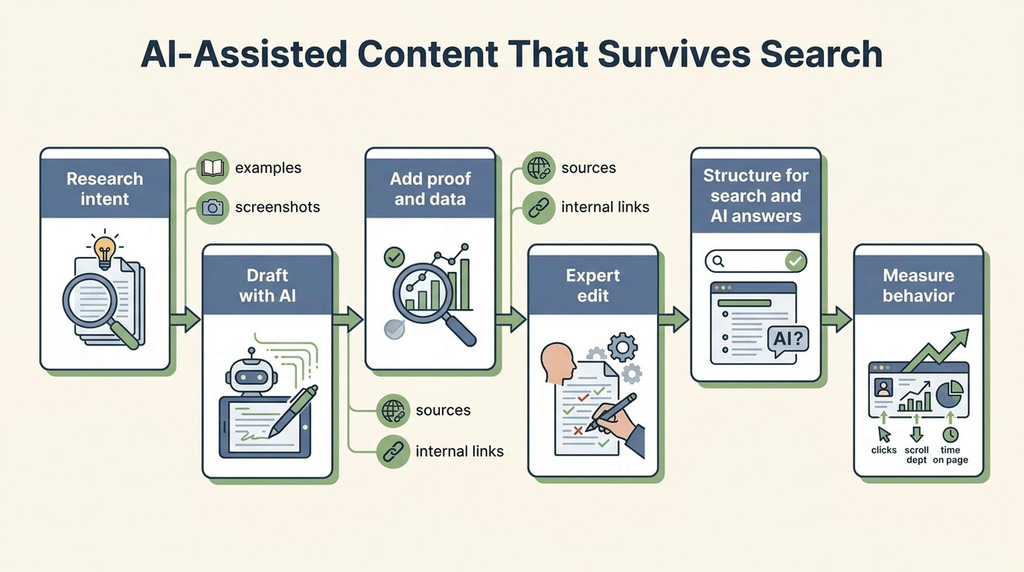
A workflow that holds up
This seven-step workflow uses AI where it’s strong and people where they’re essential. It works for a single blog post or for a content team publishing every week.
Step 1: Start with what only you know
Before opening any AI tool, write down what you or your business can contribute that a chatbot can’t. Call it an experience inventory:
- Real examples from your work, clients, or students
- Numbers from your own data, even small ones
- Mistakes you’ve seen people make, and why
- Opinions you hold that others in your field might disagree with
- Photos, screenshots, or documents you can show
- People in your organization who can be quoted or interviewed
If this list is empty, the article probably shouldn’t be written yet. That’s the single most useful test in this workflow.
Step 2: Research the search and the reader
Use keyword tools and Google’s results page to understand intent: what people searching this topic want, and what currently ranks. AI can help brainstorm reader questions, but check them against real sources such as People Also Ask, customer queries, and Search Console.
Step 3: Write the brief and outline yourself
Decide the angle, structure, and key points, using AI suggestions if helpful. The outline should show where each item from your experience inventory will appear. If the outline could have been produced without the inventory, it’s still a commodity outline.
Step 4: Draft, with or without AI
If you use AI for a draft, give it your outline, your notes, and your examples, not just a topic. A prompt like “Write a blog post about Google Business Profile” produces generic content. A better prompt supplies the material:
Draft the section “How to respond to negative reviews” for a guide aimed at clinic owners in Bangalore. Use these points from our team: [notes]. Include this real example (details changed): [example]. Use plain, direct language. Don’t add statistics or claims that aren’t in my notes.
That last instruction matters. It reduces the chance of invented facts slipping in.
Step 5: Add the experience layer
Go through the draft and add what only a person can: your examples, data, screenshots, specific recommendations,s and honest trade-offs. Replace general statements (“many businesses struggle with reviews”) with specific ones (“the most common mistake we see is replying to negative reviews from a personal account”).
Step 6: Fact-check every claim
Check every statistic, date, product feature, price, policy, and quote against a reliable source, ideally the original. Delete anything you can’t verify. Pay special attention to platform features, which change constantly, and to anything involving health, money, or law.
Step 7: Edit for voice, then review as a reader.
Read the piece aloud. Cut predictable openings, filler transitions, and conclusions that repeat the introduction. Make sure it sounds like your brand, not like every other AI-assisted blog.
Then read it as a searcher would. Does it answer the question quickly? Does it say something they couldn’t get from an AI Overview? Would you send it to a client? If not, it isn’t ready.
Authorship, disclosure and the “Who, How, Why” test
Alongside its 2023 AI guidance, Google added a simple framework to its helpful content documentation: ask who created the content, how it was created, and why.
Who? Would a reader know who wrote this and why they’re qualified? Google encourages bylines where readers would expect them, linking to information about the author. For a training institute, agency, or clinic, a named practitioner’s byline with a short, factual bio is a strong trust signal. A post credited to “Admin” is not.
The January 2025 rater guidelines also caution against overstated expertise claims. A bio should describe real experience accurately, not inflate it.
How? Would readers expect to know whether AI was used? Google suggests disclosing automation when readers would reasonably expect it, for example, if a page is largely machine-generated or if AI-generated images could be mistaken for real photos. There’s no ranking reward for a disclaimer, but honesty protects trust. Many publishers now include a short editorial note explaining that AI tools assist with research or drafting and that every article is written, checked, and edited by a named person.
Why? This is the question Google treats as most important. Was the page created mainly to help people, or mainly to attract search traffic? If the honest answer is “we needed more pages for SEO”, the page is at risk,k however it was written.
A practical policy for small teams
If you publish regularly, write down a one-paragraph AI policy for your content. For example: AI tools may be used for research, outlining, drafting and editing; every article has a named human author who adds first-hand experience; every factual claim is verified before publishing; AI-generated images are labeled. It keeps writers consistent and gives you a clear answer if a client or reader asks.
Worked example: the same article written two ways
This is a hypothetical example. A Bangalore waterproofing company wants a blog post targeting “how to prevent water leakage in apartments before monsoon”.
Version A: one prompt, published as is
The marketing intern types the topic into an AI tool and publishes the result after a quick read. It’s well written and 1,200 words long. A typical paragraph:
Water leakage can seriously damage your home. To prevent it, regularly inspect your roof, clean your gutters, seal any cracks, and consider professional waterproofing services. Taking these steps can help protect your property during the monsoon season.
Nothing in it is wrong. Nothing in it is useful either. It mentions gutters, which most Bangalore apartments don’t have. It could describe a house in any city in the world. It would look almost identical to the top ten results already ranking, and to Google’s own AI Overview.
Version B: the workflow
Experience inventory. The company’s senior technician has inspected hundreds of apartments. Asked where leaks start, he lists the same few places every year: bathroom floor joints that seep into the flat below, terrace parapet cracks, gaps around AC outlet holes, and balcony slopes that drain towards the room instead of away.
Outline. Built around those four leak points, plus a section on what residents can check themselves, what needs a professional, and a rough sense of cost ranges from the company’s own jobs.
Draft. AI drafts sections from the technician’s notes, with instructions not to add facts.
Experience layer. The writer adds the technician’s photos of each leak point, a simple ten-minute self-check residents can do, and one mistake he often sees: painting over damp patches, which hides the problem until it worsens.
Fact-check and edit. Cost ranges are confirmed with the operations team and labeled as typical, not quotes. Generic advice that doesn’t apply to apartments is cut.
The difference
| Version A | Version B | |
| Time to produce | Minutes | A few hours, including a 30-minute interview |
| Original information | None | Four specific leak points, photos, a self-check, a common mistake |
| Relevance to Bangalore apartments | Generic | Specific |
| Reason to click instead of reading an AI Overview | None | Clear |
| Trust signals | Unnamed author | Technician named and quoted |
| Likely to bring inquiries | Unlikely | Plausible, because readers see expertise |
Version B still used AI. The difference is that AI did the typing, while people supplied the substance.
Common mistakes
Publishing AI drafts without editing. The draft is a starting point. Unedited output is exactly what Google’s rater guidelines describe as low effort.
Scaling before proving quality. Publishing fifty AI articles in a month before checking whether five of them perform invites scaled content problems and wastes effort.
Trusting AI facts. AI tools can invent statistics, quotes, and sources that look real. If you can’t find the source, delete the claim.
Relying on AI detectors. Detection tools are unreliable, and Google doesn’t use a simple “AI or not” test for ranking. Rewriting text to fool a detector doesn’t make it more useful. Focus on value instead.
Using AI for topics where errors cause harm. Health, legal, financial, and safety content needs qualified review, whatever tools were used.
Hiding behind generic bylines. Content attributed to “Team” or “Admin” misses one of the clearest trust signals available.
Letting AI flatten your voice. If your blog sounds identical to competitors’, readers have no reason to remember you or choose you.
A pre-publish checklist
- Does this page contain something a chatbot couldn’t produce on its own: experience, data, examples, or a clear point of view?
- Has every fact, statistic, date, and feature been checked against a reliable source?
- Is a named, qualified author credited, with an accurate bio?
- Does it answer the searcher’s question better than the current top results and the AI Overview?
- Has it been edited to sound like our brand, with filler phrases removed?
- Would we be comfortable showing it to a client or customer?
- If AI-generated images are used, are they labeled where readers might mistake them for real photos?
- Was it created mainly to help readers, not mainly to add another page for search?
Frequently asked questions
Does Google penalize AI-generated content?
Not for being AI-generated. Google says appropriate use of AI isn’t against its guidelines and that it rewards high-quality content however it’s produced. Content made mainly to manipulate rankings, including mass-produced AI pages, can be treated as spam.
Can Google detect AI-written content?
Google doesn’t say it ranks pages based on whether AI wrote them. Its systems focus on quality, originality, and spam patterns. Low-effort AI content tends to fail because of those qualities, not because of a detection label.
Is it safe to use ChatGPT or other AI tools for blog writing?
Yes, if a person adds real value: first-hand experience, verified facts, editing, and a clear point of view. Publishing unedited AI output is the risky part.
Should I disclose that I used AI?
Google suggests disclosing AI use where readers would reasonably expect to know, for example, when content is largely machine-generated or when AI images could be mistaken for real photos. It isn’t a ranking factor, but it builds trust.
Do AI content detectors matter for SEO?
Not directly. Detectors are often inaccurate, and passing one doesn’t make content helpful. Judge your content by what it offers readers, not by a detector score.
How much AI is too much?
There’s no percentage rule. The question is whether you’ve added enough experience, accuracy, and judgment for the page to offer something AI alone couldn’t. If the page would be the same without your involvement, it’s too much.
Will AI replace content writers?
It’s changing the job rather than removing it. Writers who rely on producing generic text are under pressure; those who can interview experts, verify facts, find original angles, and use AI efficiently are more valuable. Working with AI tools is now part of the skill set.
Where can I learn to use AI tools properly in content marketing?
Practice on real content with real feedback. At Web Marketing Academy, learners use AI content tools as part of practical content and SEO training, alongside the editing, research, and fact-checking that make AI-assisted content work.
