
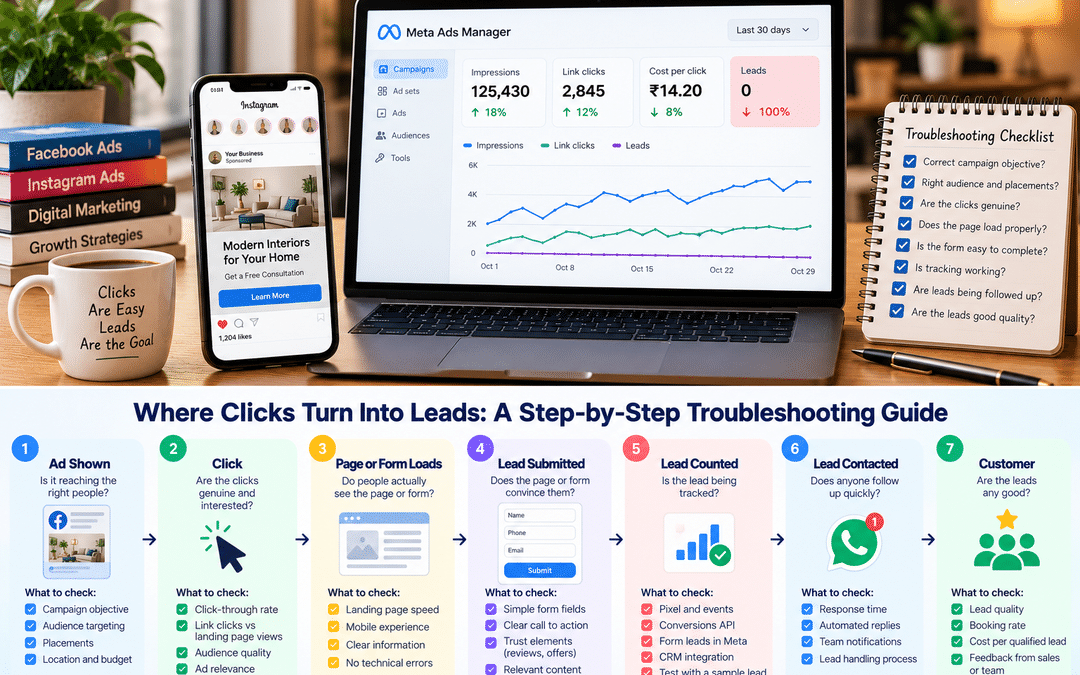
The dashboard looks healthy—thousands of impressions, hundreds of clicks, a cost per click that seems reasonable. Yet the phone isn’t ringing, the inquiry form is empty, and the business owner is asking why they’re paying for Facebook and Instagram ads at all.
Clicks without leads are one of the most common problems in Meta advertising, especially for small businesses and new marketers. The usual reaction is to change something immediately: a new image, a different audience, a bigger budget. Sometimes that works by luck. More often it hides the real problem.
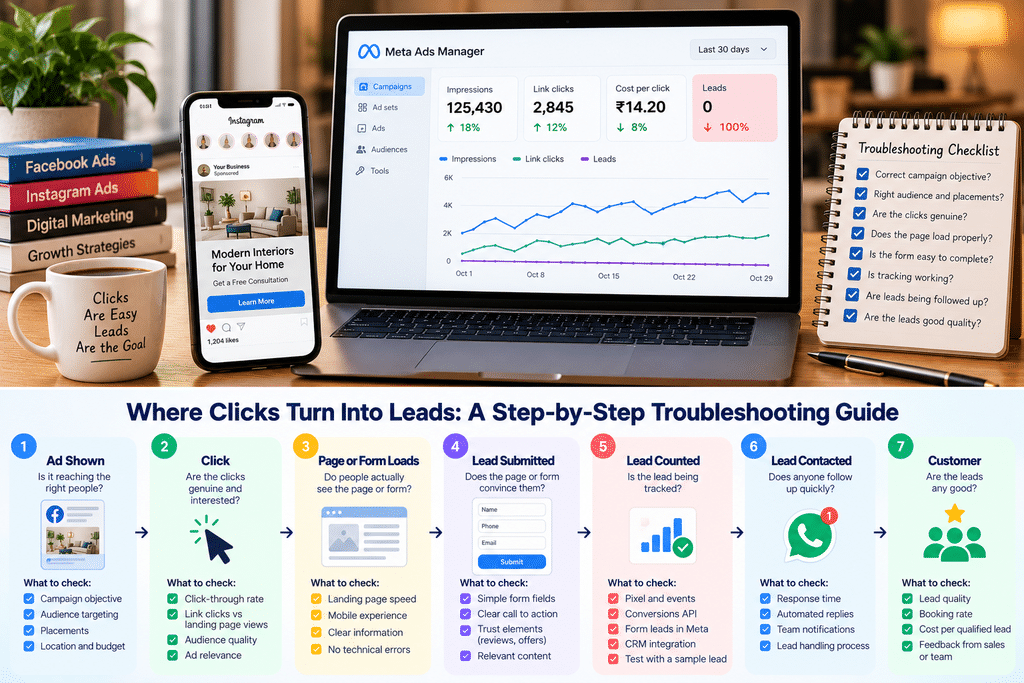
The better approach is to find where the journey breaks. Every lead passes through a series of stages, and each one can leak:
| Stage | Question to ask | Where to look |
| Ad shown | Is it reaching the right people? | Audience, placements, location |
| Click | Are the clicks genuine and interested? | Click-through rate, link clicks vs landing page views, placements |
| Page or form loads | Do people actually see the page or form? | Landing page views, page speed |
| Lead submitted | Does the page or form convince them? | Conversion rate, form completion |
| Lead counted | Is the lead being tracked? | Pixel, Conversions API, events |
| Lead contacted | Does anyone follow up quickly? | Response time, lead handling |
| Customer | Are the leads any good? | Lead quality, booking rate |
This checklist works through those stages in a practical order. It’s written for business owners, freelancers and junior marketers running Facebook and Instagram lead campaigns, and it applies whether you send people to a website or use Meta’s instant forms.
Step 1: Check what Meta is optimizing for
Meta’s delivery system is very good at getting you exactly what you ask for. The problem is that many campaigns ask for the wrong thing.
The objective decides who sees your ads.
Meta Ads Manager offers six campaign objectives: Awareness, Traffic, Engagement, Leads, App Promotion, and Sales. Each one tells Meta to find a different kind of person.
| If you chose | Meta looks for people likely to | What you’ll often get |
| Traffic | Click a link | Plenty of cheap clicks from people who click often, but rarely enquire |
| Engagement | Like, comment, share or message | Reactions and comments, sometimes chats |
| Leads | Submit a form, call or message to enquire | Fewer clicks, more inquiries |
| Sales | Complete a conversion you define | Depends on the conversion event you choose |
This is the single most common cause of “clicks but no leads”. A Traffic campaign that delivers cheap clicks is working exactly as designed. It just isn’t designed to produce leads.
Fix: If you want inquiries, use the Leads objective (or Sales, with a lead event as the conversion), and choose where leads should happen: an instant form, your website, a call, or a messaging app such as WhatsApp.
Check the optimization event.
Within a Leads campaign, check what the ad set is optimizing for. If it’s website leads, Meta needs a correctly firing lead event on your site; Step 2 covers this. Advertisers who send lead outcomes back from their CRM can also optimize for leads more likely to convert, rather than all form submissions.
Know which automated features are on
Meta has made its Advantage+ automation the default setup for many new campaigns. Industry guides report that since early 2026, Advantage+ budget, audience, and placement settings are enabled by default, and Advantage+ Creative enhancements are switched on automatically for new Leads campaigns.
Automation isn’t the enemy. Meta’s systems often find people you wouldn’t have targeted. But you should know what’s switched on, because it affects where your ads appear and how they look. Review each Advantage+ Creative enhancement rather than accepting them all unquestioningly; some may change your images or text in ways that don’t suit your brand.
Step 2: Check tracking
Sometimes leads exist but aren’t being counted, or nobody’s looking in the right place. Other times, broken tracking sends Meta’s optimization in the wrong direction. Check this before changing any ads.
For instant forms: are leads sitting in Meta, unseen?
Leads from Meta’s instant forms don’t arrive in your inbox automatically. They’re stored in Meta, where you can view and download them from your Page’s lead tools or Meta Business Suite, or send them to a CRM or spreadsheet through an integration.
It’s surprisingly common for a business to run lead form ads for weeks without anyone opening this section. Check it first. Then connect the form to where your team actually works, a CRM, Google Sheet, email alert, or WhatsApp notification, so someone gets new leads within minutes.
For website leads: is the lead event firing correctly?
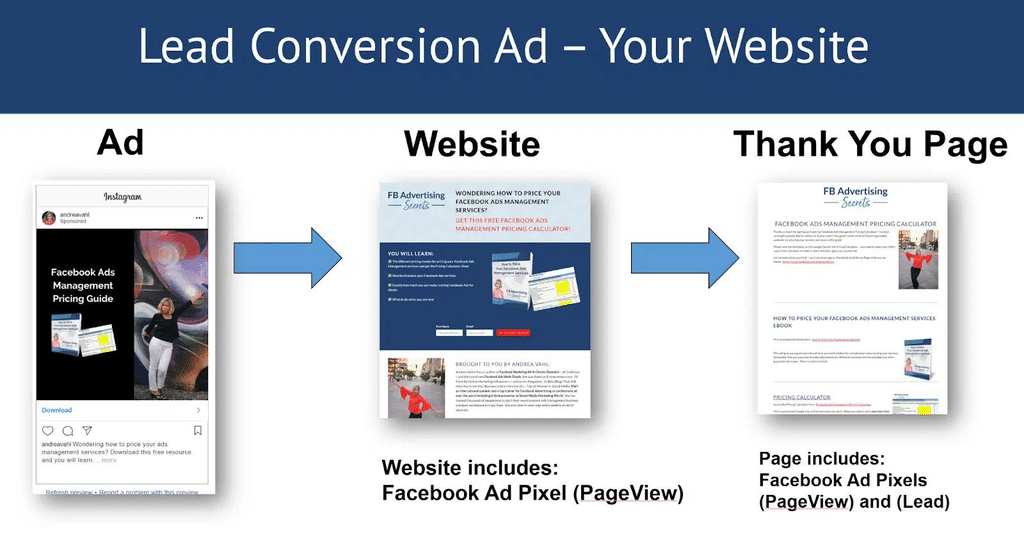
If people submit an inquiry form on your website, Meta needs to know. That’s the job of the Meta Pixel (in the browser) and the Conversions API (from your server or platform).
Check these in Events Manager:
- Is a Lead event recorded at all? Use the Test Events tool, submit a test inquiry, and confirm the event appears.
- Does it fire at the right moment? It should fire after a successful submission, typically on the thank-you page, not when the contact page loads. A Lead event that fires on page load counts every visitor as a lead, and Meta will optimize towards people who merely visit.
- Is it firing twice? Duplicate installations, such as a plugin plus manually added code, can double-count leads. If you use both the Pixel and the Conversions API, events should be deduplicated.
- Did a website change break it? A new form plugin, theme, or thank-you page URL can silently stop the event from firing.
Why the Conversions API matters
Browser tracking alone misses some conversions because ad blockers, privacy settings, and browser restrictions can block it. The Conversions API sends conversion data from your server or CRM directly to Meta, which gives its systems a more complete picture. Many website platforms and WordPress plugins offer a simple way to set it up.
Compare Meta’s numbers with reality.
Count the inquiries you actually received from Meta ads in a week, and compare them with the leads Meta reports. A large gap in either direction points to a tracking problem worth fixing before anything else.
Step 3: Check the quality of the clicks
Not all clicks are equal. Some come from interested people. Others are accidental taps, curious scrollers, or people far outside your service area.
Compare link clicks with landing page views
In Ads Manager, add both columns to your report:
- Link clicks: taps on the ad’s link
- Landing page views: visits where your page actually loaded and the Pixel recorded it
A large gap between the two is a warning sign. It usually means the page loads too slowly, especially on mobile data, or that many clicks were accidental and people left before the page appeared.
Also check that you’re looking at link clicks, not “clicks (all)”. The “all” figure includes taps on your profile name, likes, and “see more”, which make the ad look busier than it is.
Break results down
Use the Breakdown menu in Ads Manager to view results by:
| Breakdown | What to look for |
| Placement | Placements with many clicks but no leads. Some placements tend to produce lower-intent or accidental clicks for lead generation. |
| Region or city | Clicks from areas you don’t serve |
| Age and gender | Groups that click a lot but never enquire |
| Device | Whether mobile users are clicking but failing to convert, which often points to a page problem |
| Time of day | Hours that bring clicks but no inquiries |
Don’t exclude something on the first sign of weakness. Small numbers swing a lot. But if a placement or region has spent a meaningful amount over a couple of weeks with no leads, it’s worth acting on.
Check the location settings.
For local businesses, confirm that the ad set targets the areas you actually serve, and check whether it reaches people living there or anyone who has recently been there. A salon in Indiranagar doesn’t benefit from clicks across the whole of Karnataka.
Watch for junk leads.
If leads arrive but contain fake names, wrong phone numbers, or people who don’t remember submitting, the problem is lead quality, not volume. Step 4 covers form settings that help.
Step 4: Check the landing page or lead form
If people reach your page or form and still don’t enquire, the problem is usually what they find there.
If you use a website landing page
Open your ad on your own phone, on mobile data rather than office Wi-Fi, tap through, and look at the page as a stranger would.
- Does it match the ad? If the ad promises “Modular kitchens from ₹1.5 lakh”, the page should show modular kitchens and that price, not your homepage or a general services page.
- Does it load quickly on a phone? Large images, sliders, and pop-ups slow mobile pages badly.
- Is the next step obvious? Put a visible inquiry button, phone number, or WhatsApp button near the top, not buried at the bottom.
- Is the form short? Ask only what you need to follow up. Every extra field loses some people.
- Is there a reason to trust you? Reviews, photos of real work, your address, years in business, clear pricing or price ranges.
- Is there an alternative to the form? Many Indian customers prefer to call or WhatsApp. Offer both.
If you use Meta’s instant forms
Instant forms open inside Facebook or Instagram and pre-fill details from the user’s profile. That makes them quick to submit, which helps volume but can hurt quality: some people submit without really reading.
Two settings make a big difference:
- Form type. Meta offers a form type designed for more volume and one designed for higher intent. According to WordStream’s guidance, the higher intent option adds a review step before submission, which helps filter out accidental submissions. If lead quality is poor, test it.
- Qualifying questions. Add one or two short custom questions, such as preferred locality, budget range, or timeline, ideally multiple choice. They slow down casual submitters and give your team useful context.
Also write a clear intro screen explaining exactly what happens after they submit: “Our designer will call you within one working day to understand your requirements.” People who know what to expect are more likely to answer the phone.
Website or instant form: which is better?
Neither is always better. Instant forms usually produce more leads at a lower cost, often with lower quality. Website forms usually produce fewer, more considered leads, if the page is good. If your instant form leads aren’t picking up the phone, test a website landing page or a higher-intent form.
Step 5: Check the offer and the creative
If tracking works, the clicks are genuine, and the page is good, but people still don’t enquire, look at what you’re asking them to do and why.
Is the offer strong enough?
On Facebook and Instagram, people aren’t searching for you. They were scrolling past friends’ photos and reels. Your ad interrupts them, so it needs a clear reason to act now.
| Weak offer | Stronger offer |
| “Contact us for the best interior designs” | “Free 3D design of your kitchen with a fixed quote in 48 hours” |
| “Join our IELTS classes” | “Free diagnostic test and a personal band score plan. Weekend batches near Jayanagar” |
| “Best skin clinic in Bangalore” | “Acne consultation with a dermatologist. Evening slots available this week” |
A stronger offer is specific, relevant to a real need, and lowers the perceived risk of enquiring. It doesn’t have to be a discount.
Is the creative attracting the right people?
Your image or video does more than get attention; it decides who stops and clicks. Industry guides describe Meta’s current ad delivery system as using creative itself as a key targeting signal: the people who engage with an ad shape who it’s shown to next.
That means clickbait attracts clickers. A video of a dramatic kitchen makeover with no price context may win lots of curious viewers who can’t afford it. An honest ad showing real work, the starting price, and the area you serve attracts fewer, better people.
Checks:
- Does the ad say who it’s for? “For 2BHK and 3BHK apartments in East Bangalore” filters out people you can’t serve.
- Is the price, or at least a range, visible? Mentioning a starting price reduces inquiries from people outside your budget.
- Does it show real work and real people? Stock images look like every other ad.
- Do you have variety? Test a few genuinely different concepts, such as a customer story, a before-and-after, and an explainer from your team, not five versions of the same image.
Has the ad gone stale?
If results were good and have slowly declined, check frequency, the average number of times each person has seen the ad. When the same small audience sees the same ad many times, interest drops. Fresh creative usually helps more than changing the audience.
Step 6: Check what happens after the lead
Sometimes the ads are fine, and the leads are real, but the business loses the after-sales. Owners then conclude that “Facebook leads are useless,” when the real problem was follow-up.
Speed matters more than almost anything.
Someone who filled in a form five minutes ago remembers you and is still interested. Someone you call two days later may not remember submitting anything, and has probably contacted a competitor. Aim to respond within minutes during working hours, and within the first hour at the latest.
Set up instant notifications for new leads, whether by email, a CRM alert, a Google Sheet, or WhatsApp, and decide in advance who responds.
Make it easy for leads to recognize you.
Many people in India don’t answer calls from unknown numbers, especially if a caller ID app flags them. Two habits help:
- Send a WhatsApp message first: “Hi Priya, this is Rahul from [studio name]. You asked about a kitchen design on Instagram. Is now a good time for a quick call?”
- Call from a consistent business number with your business name set up properly, so you’re recognizable when you call back.
Follow up more than once
One unanswered call isn’t a dead lead. A simple sequence, such as a call, a WhatsApp message, another call later in the day, and a final message the next day, often reaches people the first attempt misses.
Record what happens
For every lead, note the outcome: contacted or not, interested or not, booked, converted, or why it was lost. After a few weeks, this tells you whether the problem is lead quality (“they didn’t need us”), price (“too expensive”), or follow-up (“never reached them”).
If you can, send these outcomes back to Meta through a CRM integration or the Conversions API. It helps Meta’s systems learn which kinds of leads actually become customers.
Step 7: Check budget, learning and patience
The last check is about expectations. Some campaigns aren’t broken; they simply haven’t had enough time or budget to settle.
The learning phase
When a new ad set starts, or after a significant change, Meta’s system spends a period exploring who responds. During this learning phase, costs are often higher and results less stable.
According to guides citing Meta’s Business Help Center, an ad set typically exits learning after about 50 optimization events within 7 days. If it can’t reach that, Ads Manager may show Learning limited.
What this means on a small budget
A quick illustration: if your leads cost around ₹400 each, reaching 50 leads in a week would take about ₹20,000 a week, roughly ₹2,850 a day, in a single ad set. Many small businesses spend less than that.
That’s fine. “Learning limited” isn’t a penalty, and ad sets can still produce useful leads. But it does mean:
- Don’t split a small budget across many ad sets. Five ad sets with small budgets each learn more slowly than one or two with the combined budget.
- Avoid constant edits. Significant changes, such as changing targeting, the optimization event, or the creative, can restart learning. Changing something every two days means the campaign never settles.
- Judge over a sensible period. Look at results over one to two weeks, not one to two days.
Is the budget simply too low?
If a campaign has spent only a few hundred rupees, there may not be enough data to know anything yet. Before concluding Meta ads “don’t work”, make sure you’ve spent enough to expect at least a handful of leads at a realistic cost for your category.
If you can’t afford that, focus the budget: one service, one area, one strong offer, rather than spreading it thinly.
Worked example: a Bangalore interior studio
This is a hypothetical example. The figures are illustrative, not benchmarks.
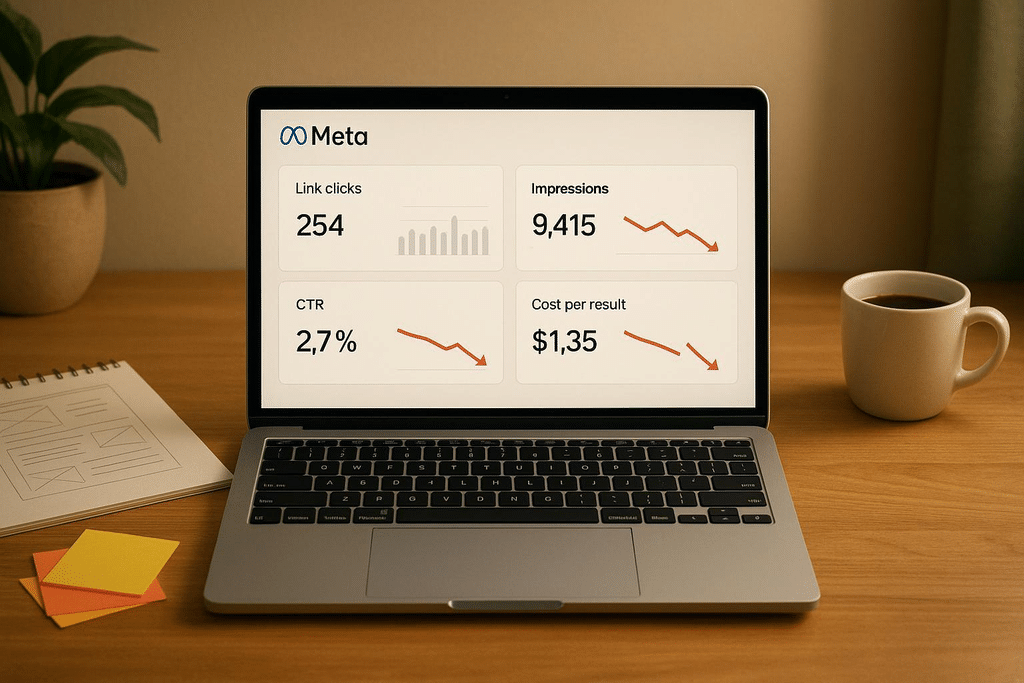
The problem. An interior design studio in Whitefield spends about ₹1,000 a day on Meta ads for three weeks. Ads Manager shows around 2,400 link clicks at a low cost per click, and even reports 140 “leads”. Yet the studio has received only nine genuine inquiries. The owner wants to stop advertising.
Working through the checklist:
| Step | What they found | What they changed |
| 1. Objective | The campaign used the Traffic objective, optimizing for clicks | Switched to the Leads objective, optimizing for website leads |
| 2. Tracking | The Lead event fired when the contact page loaded, not after submission, so every visitor counted as a “lead” | Moved the event to the thank-you page and tested it in Events Manager; added the Conversions API through the website platform |
| 3. Click quality | Landing page views were barely half of link clicks. Many clicks came from one low-performing placement, and some from across Karnataka | Excluded the placement after checking two weeks of data; limited targeting to East Bangalore |
| 4. Landing page | Ads sent people to a slow homepage with no prices | Built a mobile-friendly kitchen page with starting prices, real project photos, a short form, and a WhatsApp button |
| 5. Offer and creative | A generic “dream home interiors” image | “Free 3D kitchen design and a fixed quote in 48 hours”, with a starting price, for 2BHK and 3BHK apartments, using photos of completed kitchens |
| 6. Follow-up | Inquiries were called back the next day | Leads trigger a WhatsApp alert to the designer on duty; the first message goes out within minutes |
| 7. Budget | The budget was split across four ad sets | Consolidated into one ad set and left alone for two weeks |
After four more weeks:
| Metric | Result |
| Spend | About ₹28,000 |
| Link clicks | Fewer than before |
| Genuine leads | 38 |
| Booked design consultations | 12 |
| Cost per lead | About ₹737 |
| Cost per booked consultation | About ₹2,333 |
The cost per click went up, and the business got far more out of its spend. That’s the lesson: cheap clicks were never the goal. Whether ₹2,333 per consultation is worthwhile depends on what a typical project is worth to the studio, but now the owner has a real number to judge.
The full troubleshooting checklist
Work through these in order. Fix the first problem you find before moving on, and give each change time to show results.
1. Objective and optimization
- The campaign uses the Leads objective (or Sales with a lead event), not Traffic or Engagement.
- The ad set optimizes for the right event and conversion location
- You know which Advantage+ settings and creative enhancements are switched on
2. Tracking
- Instant form leads are being checked and sent to your team automatically
- The website Lead event fires only after a successful submission
- Events aren’t firing twice, and Pixel and Conversions API events are deduplicated
- Meta’s reported leads roughly match the inquiries you actually received
3. Click quality
- Landing page views aren’t far below link clicks
- You’re reading link clicks, not “clicks (all).”
- Placement, region, age, and device breakdowns don’t show large spend with no leads
- Location targeting matches the areas you serve
4. Landing page or form
- The page matches the ad’s promise, loads fast on mobile, and has an obvious next step.
- The form is short, and calling or WhatsApp are offered as alternatives
- Instant forms use qualifying questions, and you’ve tested the higher-intent form type if quality is poor
5. Offer and creative
- The offer is specific and gives people a reason to act now
- The ad shows who it’s for, real work, and a price or range where possible
- You have a few genuinely different creative concepts
- Frequency isn’t climbing on a stale ad
6. Follow-up
- New leads reach someone within minutes
- The first contact is a WhatsApp message or a call from a recognizable business number
- Unanswered leads get several follow-up attempts
- Lead outcomes are recorded, and ideally sent back to Meta
7. Budget and patience
- The budget isn’t split across too many ad sets
- You’re not making significant edits every few days
- You’ve spent enough, over one to two weeks, to judge fairly
Frequently asked questions
Why are my Facebook ads getting clicks but no leads?
The most common causes are using the Traffic objective instead of Leads, broken lead tracking, low-quality or accidental clicks, a landing page that doesn’t match the ad, a weak offer, or slow follow-up. Work through each stage of the journey to find where people drop off.
Should I use Meta instant forms or a website landing page?
Instant forms usually bring more leads at a lower cost, but often with lower quality, because they’re quick to submit. Website landing pages usually bring fewer, more considered leads. Test both if lead quality matters, and judge by booked customers rather than lead volume.
How do I improve the quality of Facebook leads?
Use qualifying questions in your form, test the higher-intent form type, show price ranges and who the offer is for in your ad, and follow up quickly. Sending lead outcomes back to Meta through a CRM integration or the Conversions API also helps its systems find better leads.
What does “Learning limited” mean in Meta Ads?
It means the ad set isn’t expected to reach about 50 optimization events in seven days, the typical threshold for leaving the learning phase. It isn’t a penalty, but consolidating budget and avoiding frequent edits helps results stabilize.
How long should I wait before judging a Meta ads campaign?
Usually one to two weeks, with enough spend to expect several leads. Judging after a day or two, or after very little spend, often leads to wrong conclusions.
Why does Meta show more leads than I received?
Often because the lead event fires at the wrong time, for example, when a page loads instead of after a form submission, or because it’s installed twice. Check your events in Events Manager.
Is Meta ads better than Google Ads for leads?
They work differently. Google Search ads reach people already searching for a service, so intent is usually higher. Meta ads reach people based on interests and behavior as they browse, so the offer and creative must generate interest. Many local businesses use both.
Where can I learn to run Meta ads properly?
Hands-on practice with real campaigns teaches the most. At Web Marketing Academy, practical training covers Meta Ads Manager and social media advertising, with learners working on live projects.
