
Ask a Bangalore customer how they’d like to contact a business, and many will say, “Just WhatsApp me.” They’d rather send a message than fill in a form, wait on hold, or check an email. For a salon, clinic, bakery, coaching center, interior studio, or D2C brand, WhatsApp is often where inquiries, bookings, order updates, and follow-ups actually happen.
That makes WhatsApp one of the most practical marketing channels for small businesses in India. It also makes it easy to misuse. Businesses add every phone number they’ve ever collected to a broadcast list, send daily offers, get blocked, and then wonder why messages stop being delivered. Others pay for WhatsApp tools they don’t need, or run Click-to-WhatsApp ads without anyone ready to reply.
This guide explains how WhatsApp marketing works for small businesses today. It covers the difference between the free WhatsApp Business app and the WhatsApp Business Platform (often called the API), how Meta’s current pricing works, how to send marketing messages without damaging your reputation, how Click-to-WhatsApp ads fit in, and how to measure what WhatsApp actually brings in.
WhatsApp’s features, limits,s and prices change often. The details here were checked in October 2026; confirm current terms on Meta’s official pages before making decisions.
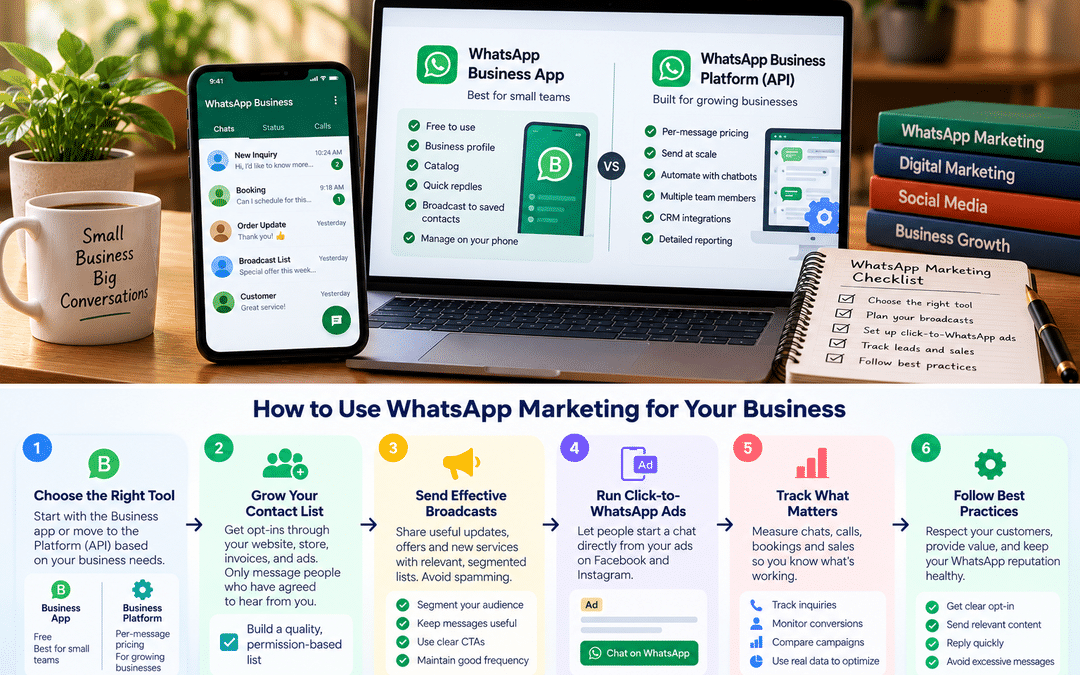
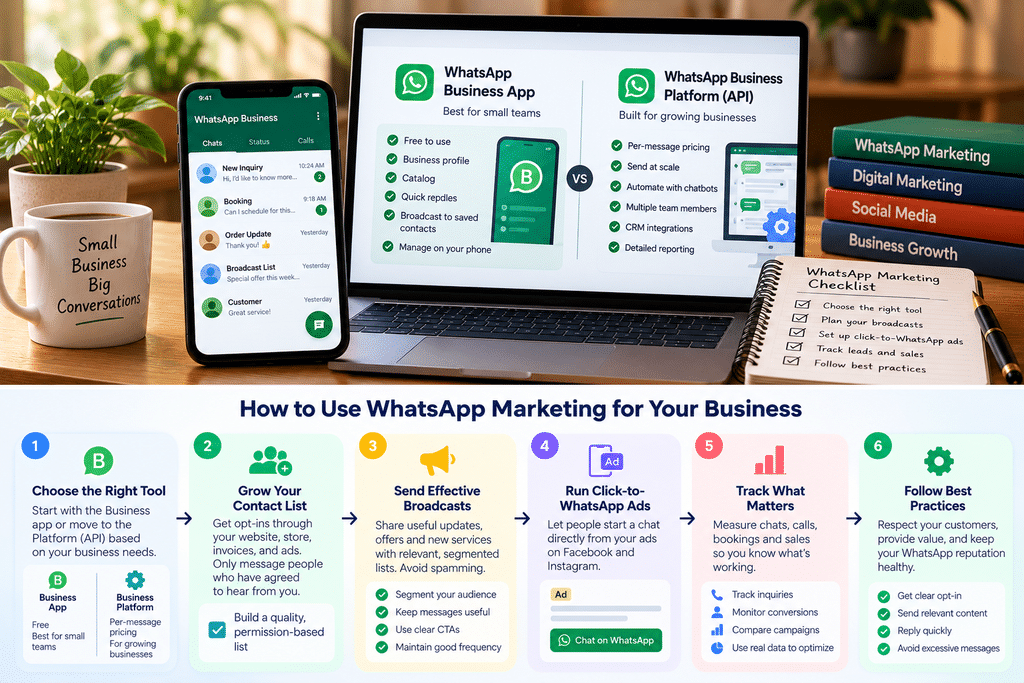
WhatsApp Business App vs WhatsApp Business Platform (API)
WhatsApp offers businesses two different products. Choosing the right one is the first decision, and many small businesses move to the second one too early or too late.
The WhatsApp Business app is a free mobile app, similar to regular WhatsApp, with added business features: a business profile, a catalog, quick replies, labels, greeting and away messages, and broadcast lists. You manage chats yourself on your phone or a few linked devices.
The WhatsApp Business Platform, commonly called the WhatsApp Business API, isn’t an app you download. Businesses access it through Meta’s Cloud API or, more commonly for small businesses, through a Business Solution Provider (BSP) such as an Indian WhatsApp marketing platform. It supports automation, chatbots, multiple team members, CRM integration, and large-scale messaging. Meta charges per message delivered, and providers usually add their own fees.
| WhatsApp Business app | WhatsApp Business Platform (API) | |
| Cost | Free | Meta’s per-message charges, plus provider fees |
| How you use it | Mobile app, plus a few linked devices | A provider’s web dashboard or your own software |
| Broadcasts | Lists of up to 256 contacts, and only people who have saved your number receive them | No fixed list size; sending scales with Meta’s messaging limits and your quality rating |
| Business-initiated messages | Free-form | Must use pre-approved message templates |
| Automation | Quick replies, greeting and away messages | Chatbots, automated flows, triggers from your website or CRM |
| Team access | Limited | Multiple agents with a shared inbox, through most providers |
| Integrations | None | CRM, e-commerce, booking and payment systems |
| Reporting | Basic | Detailed delivery, read, and response data |
Comparison details are from provider guides checked in October 2026. Meta updates these features often.
Which one do you need?
Stay with the Business app if one or two people handle chats, you get a manageable number of conversations each day, your marketing messages go to a few hundred loyal customers who have saved your number, and you don’t need automation.
Consider the Platform if several people need to answer chats, you want to message thousands of opted-in customers, you need automated replies outside working hours, or you want WhatsApp connected to your website, CRM, or order system.
Moving a number to the Platform has historically meant it could no longer be used in the regular app. Meta has since introduced options that let some businesses use the same number on both. Check with your provider which setup is available before switching.
For most small local businesses, the free app is the right starting point. Upgrade when a specific limit starts costing you customers, not because a provider’s sales team says you should.
How WhatsApp Business pricing works now
The free Business app has no messaging charges. Pricing applies to the WhatsApp Business Platform, and it changed again on October 1, 2026.
Four message categories
Meta has charged per delivered message since July 1, 2025, based on the message category and the recipient’s country:
| Category | What it’s for | Examples |
| Marketing | Promotions, offers, announcements, re-engagement | Festive sale, new batch launch, “we miss you” offer |
| Utility | Updates about something the customer already did or asked for | Order confirmation, appointment reminder, delivery update |
| Authentication | One-time passwords and login codes | Login OTP |
| Service | Your replies to messages customers send you | Answering a price question, confirming a booking in chat |
What changed on October 1, 2026
According to Meta’s developer documentation, Meta now charges per message for service messages, which had been free since November 2024. It also charges for utility messages sent in response to customers within the 24-hour customer service window. Providers report that each business phone number gets 1,000 free service messages a month before charges begin.
Current rates for India
Based on Meta’s rupee rate card effective October 1, 2026, as reported by several providers:
| Category | Rate per delivered message (before GST and provider fees) |
| Marketing | ₹0.8631 |
| Utility | ₹0.115 |
| Authentication | ₹0.115 |
| Service (after 1,000 free per month) | ₹0.115 |
The same reports say India’s marketing rate was last raised on January 1, 2026, and hasn’t changed since October. Confirm current rates on Meta’s official pricing page or with your provider before budgeting.
What this means for a small business
Marketing messages cost several times more than other categories, so every promotional broadcast should be worth sending. An illustrative example: 2,000 marketing messages to opted-in customers in India would cost about ₹1,726 in Meta charges, before GST and provider fees.
Meta also reviews the category of each message template. A “utility” template that includes a promotional offer may be classified, and charged, as marketing. Keep transactional updates purely transactional.
Broadcasts and marketing messages: opt-in, frequency and quality
WhatsApp is personal. A promotional message arrives between a family group and a friend’s voice note. That’s why it gets attention, and why careless marketing gets businesses blocked quickly.
Get permission first
Meta’s WhatsApp Business policies require businesses to get opt-in before sending marketing messages. In India, the Digital Personal Data Protection Act, 2023 adds its own consent requirements for using personal data. Compliance guides recommend that WhatsApp consent be clear, specific to WhatsApp rather than bundled with email or SMS, recorded with a date and method, and easy to withdraw. If you handle customer data at scale, get legal advice on what applies to you.
Practical ways to collect opt-in:
- A checkbox on your website inquiry or checkout form: “Send me offers and updates on WhatsApp”
- A QR code at your counter or on packaging that opens a WhatsApp chat with a pre-filled “Send me updates” message
- A click-to-chat link on Instagram or your website
- Asking during a conversation: “Would you like us to send you our monthly offers here?”
A phone number collected for a delivery, an invoice, or a walk-in register isn’t permission to send promotions. Neither is a purchased list.
Broadcasts in the Business app
In the free app, broadcast lists go only to contacts who have saved your number. That’s a useful built-in permission filter. Encourage customers to save your number, and keep lists segmented: regular customers, new inquiries, past students, wholesale buyers.
Frequency and Meta’s limits
In India, WhatsApp has introduced per-user limits on marketing messages sent through the Platform. These limits count marketing messages a person receives from all businesses, so a message may not be delivered if that person has already received many. Meta adjusts these limits over time.
Your own frequency matters even more. Many practitioners treat one or two marketing messages per contact per week as an upper limit for most businesses. Fewer, more relevant messages almost always perform better.
Your quality rating
On the Platform, each business phone number has a quality rating based on how recipients respond, especially blocks and reports. According to Meta’s messaging rules, as providers summarise them, a low rating can reduce messaging limits, and persistent problems can restrict sending.
What a good marketing message looks like
- Relevant to the segment. A new batch announcement to past enquirers, not to current students.
- Short and specific. One offer, one clear action.
- Valuable. A genuine reason to read it: early access, a reminder they’d want, useful information.
- Easy to stop. Tell people how to opt out, and honor it promptly.
- Sent at sensible times. Not late at night or early in the morning.
Click-to-WhatsApp ads
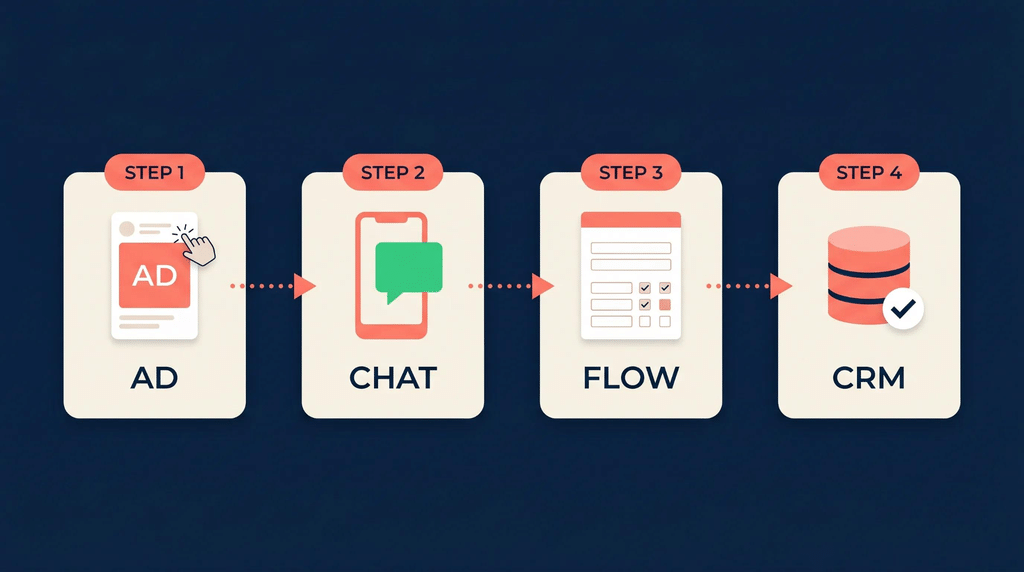
Click-to-WhatsApp ads are Facebook and Instagram ads whose button opens a WhatsApp chat with your business, instead of a website or a form. For many Indian service businesses, they’re one of the most effective ways to turn social media attention into real conversations because customers start chatting in the app they already use all day.
How they work
The customer taps the ad, WhatsApp opens with a pre-filled message such as “Hi, I’d like to know about weekend IELTS batches”, and they send it. You reply, answer their questions, and guide them towards a booking or purchase.
You can create them in Meta Ads Manager by choosing a campaign objective such as Engagement, Leads,s or Sales and selecting WhatsApp as the messaging destination. The WhatsApp Business app also lets you create simpler ads directly, for example, by promoting a catalog item once it’s linked to a Facebook Page. You pay Meta’s normal advertising costs for the ad itself.
Meta also sells ads in WhatsApp’s Updates tab, Status, and Channels. These are a separate format; they never appear inside personal chats.
The free entry point window
If you use the WhatsApp Business Platform, conversations started from a Click-to-WhatsApp ad come with a cost advantage. According to provider guides citing Meta’s pricing documentation, when you reply within 24 hours of the customer’s first message, Meta opens a 72-hour window in which your messages to that person are free, including template messages. Miss the 24-hour reply and the window doesn’t open. Providers also report that the window applies to clicks from WhatsApp’s Android and iOS apps.
For businesses on the free Business app, messaging costs nothing anyway. What matters is replying fast.
Making them work
- Reply within minutes, not hours. Someone who tapped an ad is interested now. A slow reply wastes the ad spend.
- Only run ads when someone can respond, or set up a useful automatic greeting with clear next steps.
- Write a specific pre-filled message. “I want to book a home cleaning in Whitefield” tells you far more than “Hi”.
- Ask one or two qualifying questions early: location, date, budget, requirement.
- Target carefully. Local service businesses should restrict ads to the areas they serve, as with any local campaign.
- Judge by booked customers, not conversations. A cheap conversation that never becomes a booking isn’t a good result.
Setting up for good conversations
Marketing brings people into WhatsApp. What happens in the chat decides whether they buy. These features, most of them free in the Business app, make a large difference.
The essentials in the Business app
| Feature | How to use it well |
| Business profile | Add your address, hours, website, email, and a clear description of what you do. Customers check this before trusting a business. |
| Catalogue | List your products or services with photos, short descriptions, and prices or price ranges. Share items in chat instead of typing details repeatedly. |
| Quick replies | Save answers to frequent questions, such as fees, timings, location, and how to book, and send them with a shortcut—Personalize before sending. |
| Labels | Tag chats by stage: new inquiry, follow-up, quoted, booked, paid. It turns your chat list into a simple sales pipeline. |
| Greeting message | Welcome first-time chatters and tell them what to expect: “Thanks for messaging! Share your requirement and area, and we’ll reply within 15 minutes during working hours.” |
| Away message | Set expectations outside hours, and point people to your catalog or website meanwhile. |
Make it easy to start a chat.
- Add a click-to-chat link (wa.me/91XXXXXXXXXX) to your website, Instagram bio, and Google Business Profile.
- Put a WhatsApp QR code at your counter, on packaging, and on printed material.
- Use a pre-filled message in links, so you know where the customer came from: “Hi, I saw your Instagram post about the summer batch.”
When the Platform adds real value
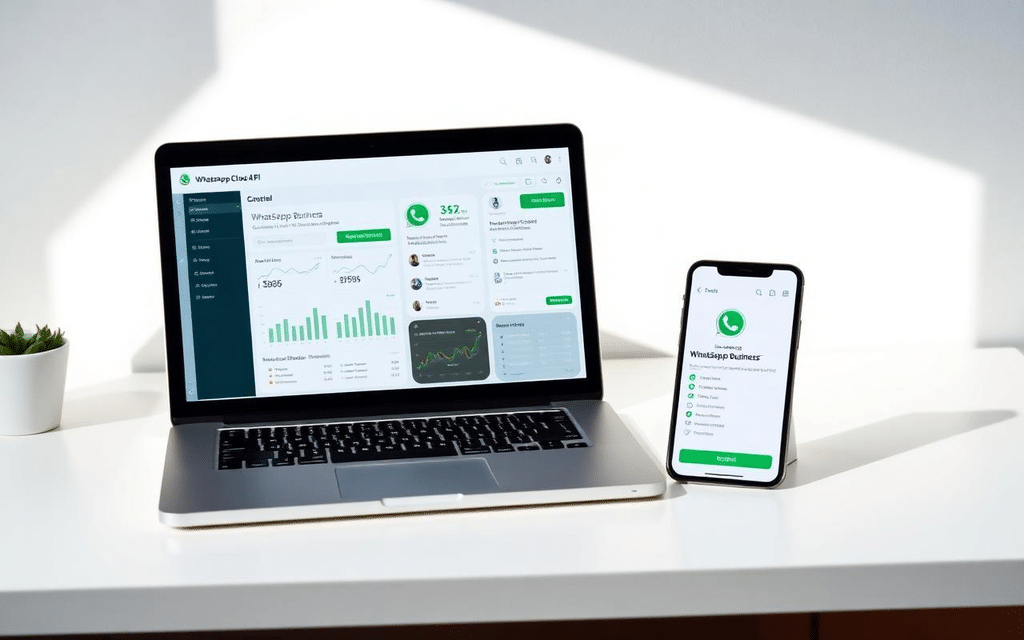
On the WhatsApp Business Platform, providers offer chatbots that answer common questions, structured booking forms, automatic order and appointment updates, and a shared inbox for teams. Meta has also introduced an AI business agent option on the Platform, which is billed separately from regular messages.
Automation helps when the same questions arrive many times a day. Keep a quick route to a human, though. Customers get frustrated when a bot can’t understand a simple request, and small businesses often win on personal service.
Response time is your biggest advantage.e
A customer who messages three salons will often book with the one that replies first with a clear answer. Decide who answers WhatsApp, during which hours, and how quickly. Track it for a week; most businesses are surprised by how long replies actually take.
Measuring WhatsApp marketing results
WhatsApp feels busy, so it’s easy to assume it’s working. Proper measurement shows which messages, ads, and sources actually bring customers.
What to measure
| Activity | Metrics that matter | Where to find them |
| WhatsApp button on your website | Clicks on the button, as a key event | GA4 |
| Click-to-WhatsApp ads | Conversations started, cost per conversation, and bookings from those chats | Meta Ads Manager, plus your own tracking |
| Marketing broadcasts | Replies, link clicks, sales, opt-outs and blocks | Business app or provider dashboard, plus UTM-tagged links |
| Platform messaging overall | Delivery and read rates, quality rating, messaging costs | Provider dashboard and WhatsApp Manager |
| All WhatsApp leads | Leads by source, conversion to customers | Labels plus a simple sheet or CRM |
Our GA4 for Beginners guide shows how to track WhatsApp button clicks as a key event.
Know where each chat came from
The hardest part of WhatsApp measurement is knowing the source. A few simple habits help:
- Different pre-filled messages for each source: one for Instagram, one for the website, one for Google Business Profile, one for each ad. The first message tells you where the customer came from.
- UTM-tagged links in broadcasts, so website visits and purchases from a broadcast show up in GA4.
- A label for each source in the Business app, or a source field in your provider or CRM.
- Asking new customers how they found you, and noting it.
The number that matters most
Count how many WhatsApp conversations became paying customers each month, and what you spent to get them, including ad spend, messaging charges,s and provider fees. Compare that with your other channels. It’s the only way to know whether WhatsApp deserves more of your time and budget.
Worked examples: two businesses, two setups
These are hypothetical examples. The figures are illustrative.
Example 1: a home bakery on the free Business app
The business. A home baker in HSR Layout takes custom cake and dessert orders, almost entirely on WhatsApp. One person handles all chats.
Setup. A complete business profile with delivery areas and order cut-off times. A catalog of cakes with starting prices. Quick replies for flavors, eggless options, delivery charges, and payment details. Labels for “inquiry”, “quoted”, “confirmed,” and “delivered”.
Marketing. Customers are asked to save the number when they place their first order. The baker keeps two broadcast lists: regular customers and corporate clients. She sends one or two messages a month, such as festive pre-order reminders a couple of weeks ahead, never daily offers. She occasionally promotes a catalog item as an ad from the Business app, targeted at nearby areas.
Why the free app is enough: volume is manageable, she knows most customers personally, and her broadcast lists are well under the 256-contact limit. Moving to the Platform would add cost and complexity without solving a real problem.
Example 2: a coaching center on the Business Platform
The business. A coaching center with three branches receives many inquiries from ads, its website, and walk-ins. Several counselors answer chats, and they miss leads.
Setup. The center moves to the Platform through an Indian provider. Counselors share one inbox with chat assignment. A simple bot answers timing and fee questions, offers to book a free demo class, and hands over to a counselor at any point. Demo class reminders go out as utility templates.
Marketing. Website and walk-in forms include a WhatsApp opt-in checkbox. When a new batch opens, the center messages only the relevant opted-in segment, not everyone. Click-to-WhatsApp ads run during counseling hours, with replies within minutes to use the free entry point window.
Estimated monthly Meta charges (illustrative, at October 2026 India rates, before GST and provider fees):
| Message type | Volume | Estimated cost |
| Marketing: batch announcement to one segment | 1,200 messages | About ₹1,036 |
| Utility: demo class reminders | 800 messages | About ₹92 |
| Service: counselor replies outside ad windows | 4,000 messages, of which 1,000 are free | About ₹345 |
| Replies inside free entry point windows | Varies | Free |
Why the Platform makes sense here. Multiple counselors, high volume, and the need to track every lead justify the cost. The messaging charges themselves are modest compared with the value of a single enrolment; provider fees and the time spent managing the system matter more.
Common mistakes
Messaging people who never opted in. It violates Meta’s policies, can conflict with India’s data protection rules, and can lead to blocks that damage your number’s quality.
Sending too often. Daily offers train customers to mute or block you. Fewer, more relevant messages work better.
Moving to the Platform too early. A provider subscription and per-message charges make little sense for a business handling a few dozen chats a day. Upgrade when a real limit costs you customers.
Mixing promotions into utility messages. A delivery update with a discount code attached may be classed and charged as marketing.
Running Click-to-WhatsApp ads without staff to reply. Slow replies waste ad spend and, on the Platform, can mean missing the free entry point window.
Using unofficial bulk-messaging tools. Tools that send mass messages through regular WhatsApp accounts, outside Meta’s official Platform, risk getting your number banned.
Bots with no way out. Automation should help customers, not trap them. Always offer a way to reach a person.
Not tracking sources. If you don’t know which chats came from ads, Instagram, or Google, you can’t tell what’s working.
Using personal WhatsApp for business. It lacks business features, mixes personal and customer chats, and leaves the business dependent on one person’s phone.
Frequently asked questions
Is WhatsApp Business free?
The WhatsApp Business app is free to download and use. The WhatsApp Business Platform (API) charges per delivered message, based on the message category and the recipient’s country, and providers usually charge their own fees on top.
How much does a WhatsApp marketing message cost in India?
According to providers citing Meta’s rate card effective October 1, 2026, a marketing message to an Indian number costs ₹0.8631, before GST and provider fees. Utility, authentication, and service messages cost ₹0.115. Check Meta’s official pricing for current rates.
Are WhatsApp replies to customers still free?
Not entirely on the Platform. From October 1, 2026, Meta charges for service messages after 1,000 free per business phone number each month. Messages inside a free entry point window, such as after a Click-to-WhatsApp ad, are free. The Business app has no messaging charges.
How many people can I send a broadcast to on WhatsApp Business?
In the Business app, a broadcast list can include up to 256 contacts, and only those who have saved your number receive it. On the Platform, there’s no fixed list size, but sending is limited by Meta’s messaging tiers, quality rating, and per-user marketing limits.
Do I need customer consent for WhatsApp marketing in India?
Yes. Meta requires opt-in for marketing messages, and India’s Digital Personal Data Protection Act, 2023 sets consent requirements for using personal data. Record when and how each person agreed, and make opting out easy.
Do Click-to-WhatsApp ads need the WhatsApp Business API?
No. They can send customers to a number on the Business app or the Platform. The Platform adds automation, team inboxes, and detailed tracking to support higher volumes.
Can I use my existing WhatsApp Business number with the API?
Often, yes, but the setup matters. Historically, moving a number to the Platform removed it from the app; Meta now offers options for some businesses to use both on one number. Confirm with your provider before migrating.
Where can I learn WhatsApp and social media marketing hands-on?
Practice on a real business is the best teacher. At Web Marketing Academy, practical training covers social media and messaging-based marketing alongside Meta ads, with learners applying it on live projects.
